Improving Your Coding Skills with ChatGPT Part I - Foundations

Some examples to effectively use the popular chatbot
If you are a professional programmer or anyone who frequently hacks in any programming language (i.e., Machine Learning or similar purposes), you know how crucial it is to have excellent coding skills.
As coding becomes more complex, it is essential to have the right tools to help you improve your coding skills.
One such tool is ChatGPT, a language model trained by OpenAI that can help you become a better programmer.
What is ChatGPT?
ChatGPT is a language model that uses artificial intelligence to generate human-like responses to text inputs.
It is trained on a large dataset of text from the internet, making it an excellent tool for improving your coding skills.
With ChatGPT, you can ask questions, get feedback on your code, and receive suggestions on how to improve your programming skills.
How Can ChatGPT Help You Improve Your Coding Skills?
ChatGPT can be used in various ways to help you become a better programmer. Here are some of the ways you can use ChatGPT to improve your coding skills:
Asking Questions
If you are stuck on a coding problem, ChatGPT can help you find the solution. You can ask ChatGPT any question related to coding, and it will generate a human-like response that can help you understand the problem better. ChatGPT can also provide you with links to relevant resources that can help you find the solution to your coding problem.
For example, if you’re working on a Python project and can’t figure out how to iterate over a list, you can ask ChatGPT, “How do I iterate over a list in Python?” and it will provide you with a detailed response that explains the concept and provides examples.
Receiving Feedback / Debugging
Feedback is crucial to improving your coding skills. With ChatGPT, you can receive feedback on your code by providing it with your code snippet. ChatGPT can analyze your code and provide you with suggestions on how to improve it. It can also help you understand why your code may not be working as intended.
For example, if you’re working on a JavaScript project and can’t figure out why your code isn’t working, you can provide ChatGPT with your code snippet and ask, “What’s wrong with my code?” ChatGPT will analyze your code and provide you with feedback on what’s causing the issue and how you can fix it.
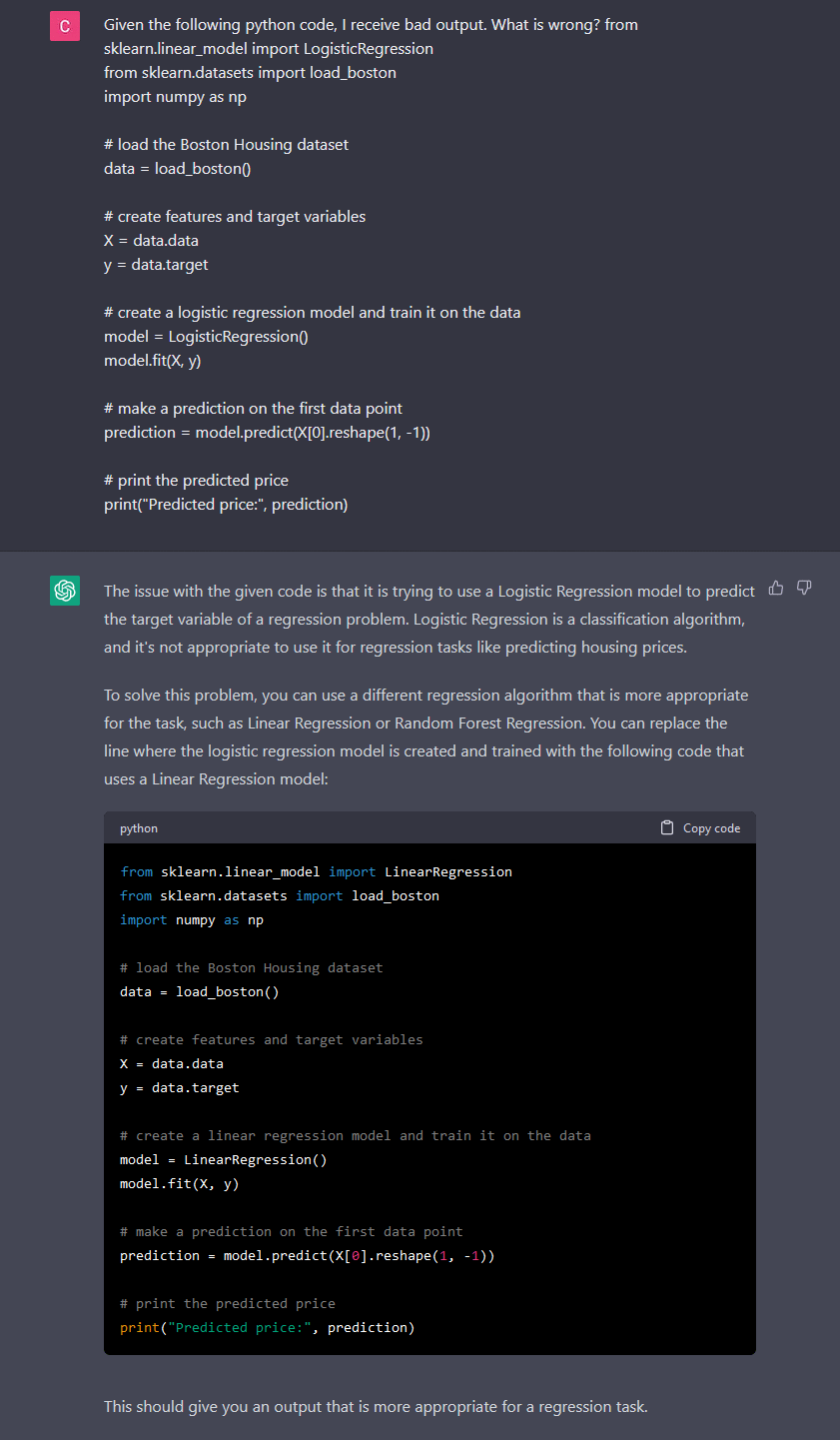
An example with a ML algorithm that is not suitable for the task:
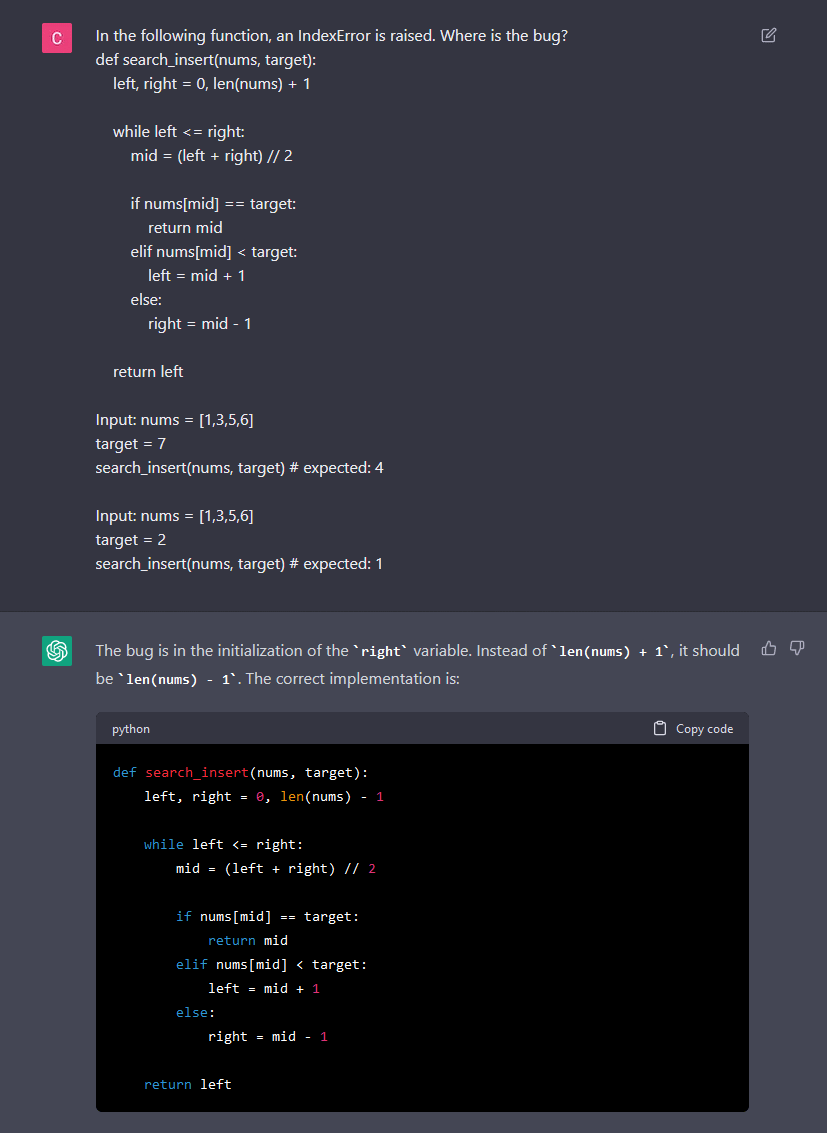
A function with a single operator switched and raises exceptions:
Documentation
Another important aspect of coding is code documentation.
Code documentation is a way to explain what your code does, how it works, and how to use it.
Good code documentation can make your code more understandable, maintainable, and reusable.
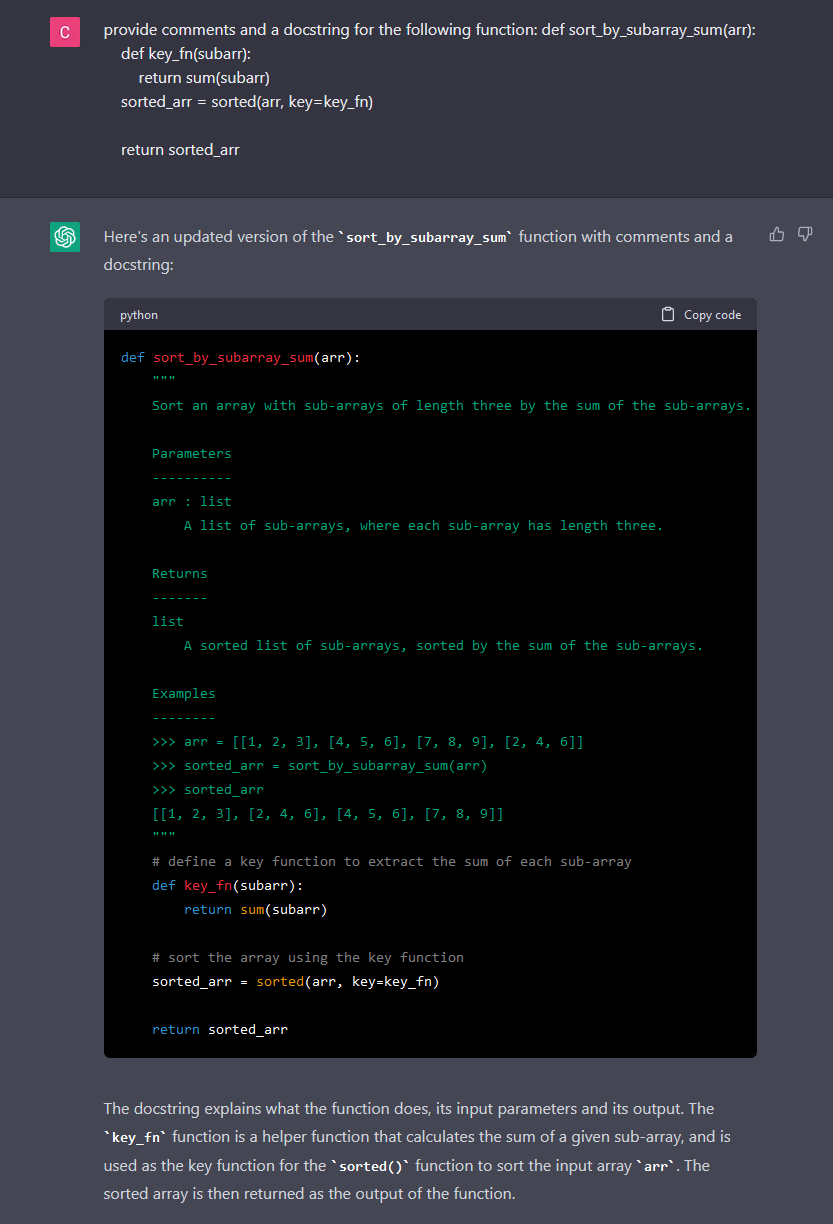
ChatGPT can help you with code documentation by suggesting comments that explain your code or docstrings that explain a function.
To use ChatGPT for code documentation, simply type in your code and wait for ChatGPT to suggest comments or a docstring that describe your code.
You can then modify these comments as needed and add them to your code.
Performance optimization
Performance is another important aspect of coding. ChatGPT can help you optimize your code for better performance by suggesting more efficient algorithms and data structures.
By optimizing your code, you can reduce execution time, improve scalability, and save computational resources.
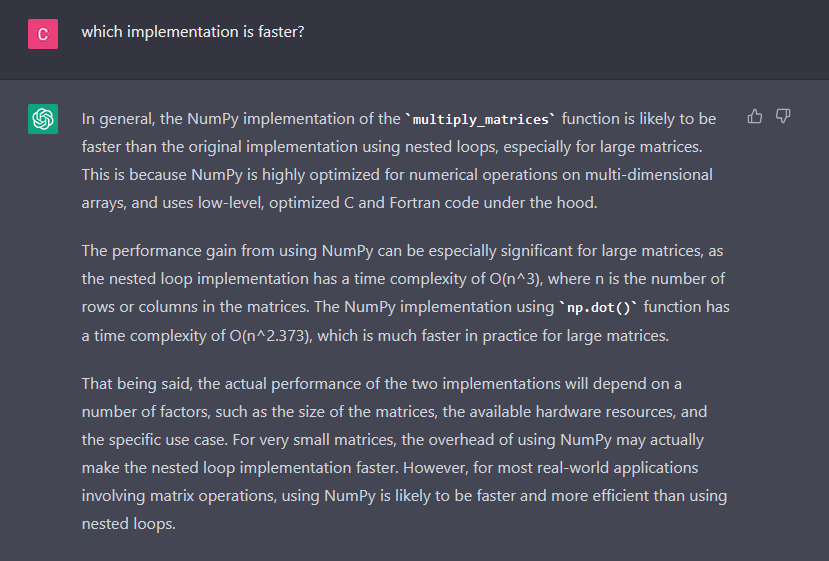
To use ChatGPT for code performance optimization, simply type in your code and wait for ChatGPT to suggest more efficient algorithms and data structures and ask for an explanation why time complexity is better.
You can then modify your code to use these suggestions.
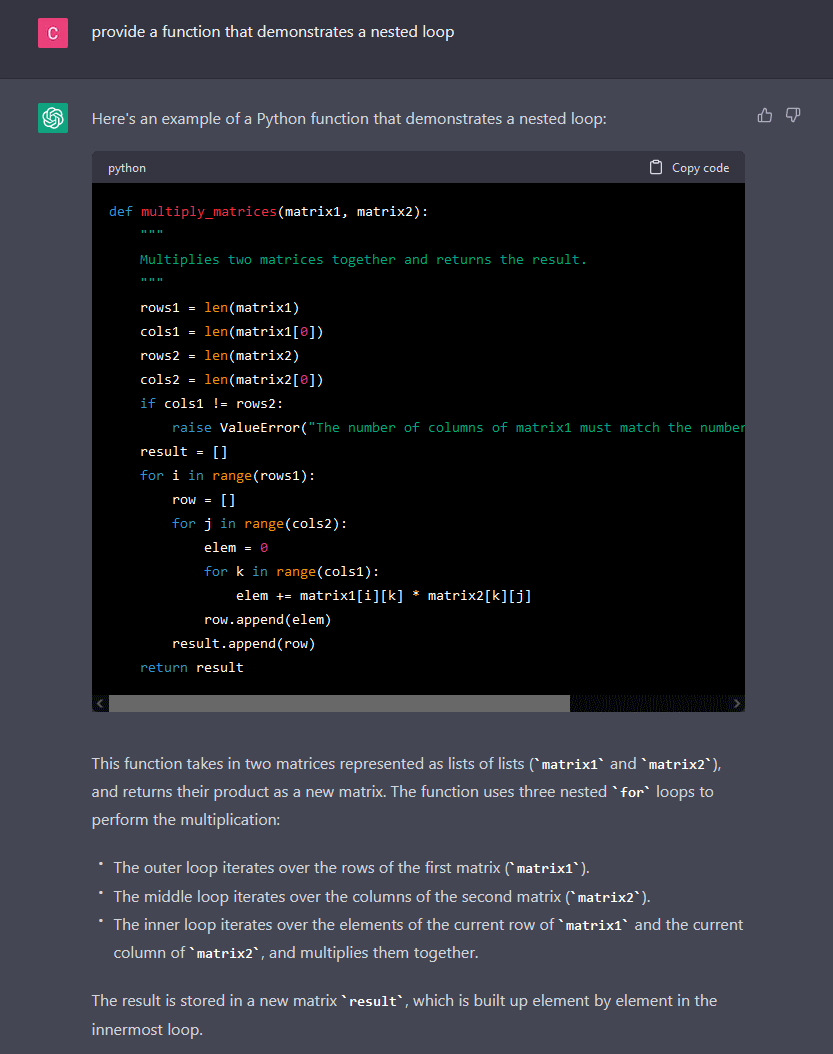
A less optimized function with three nested loops:
An optimized NumPy version of the function:
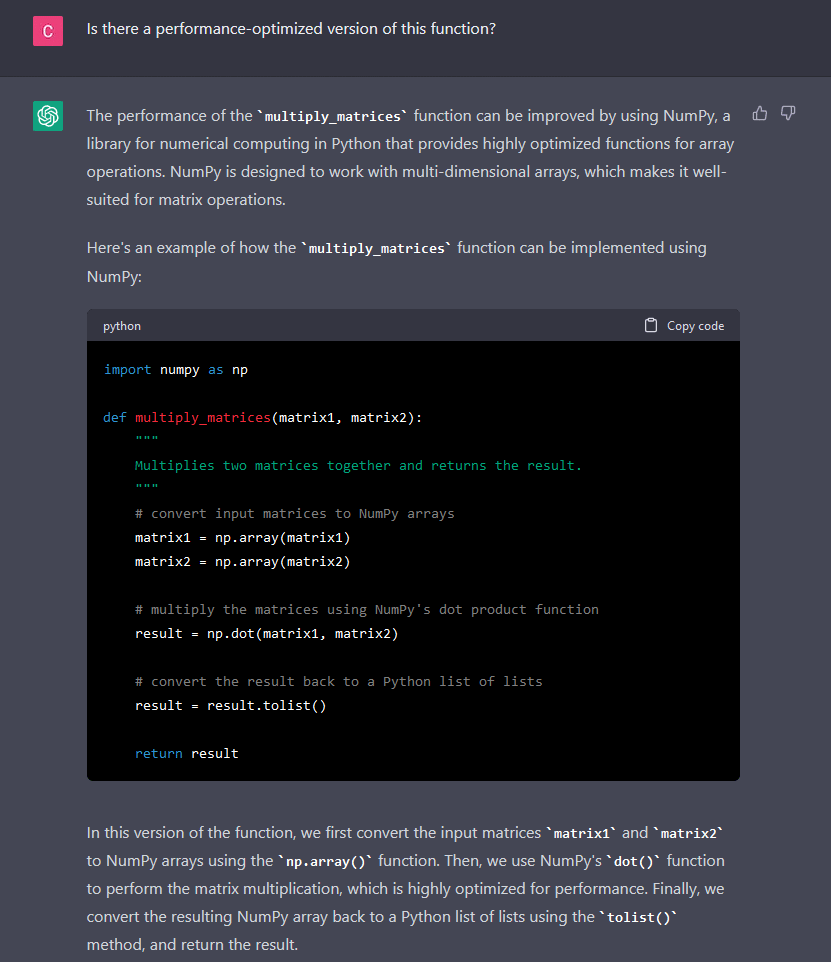
Explanation of optimization. ChatGPT knows from context that we mean the previous function (above):
Learning New Programming Concepts
ChatGPT can also help you improve your coding skills by providing you with programming exercises and challenges.
These exercises can help you practice and improve your programming skills.
You can also ask ChatGPT for recommendations on what to learn next to advance your coding skills.
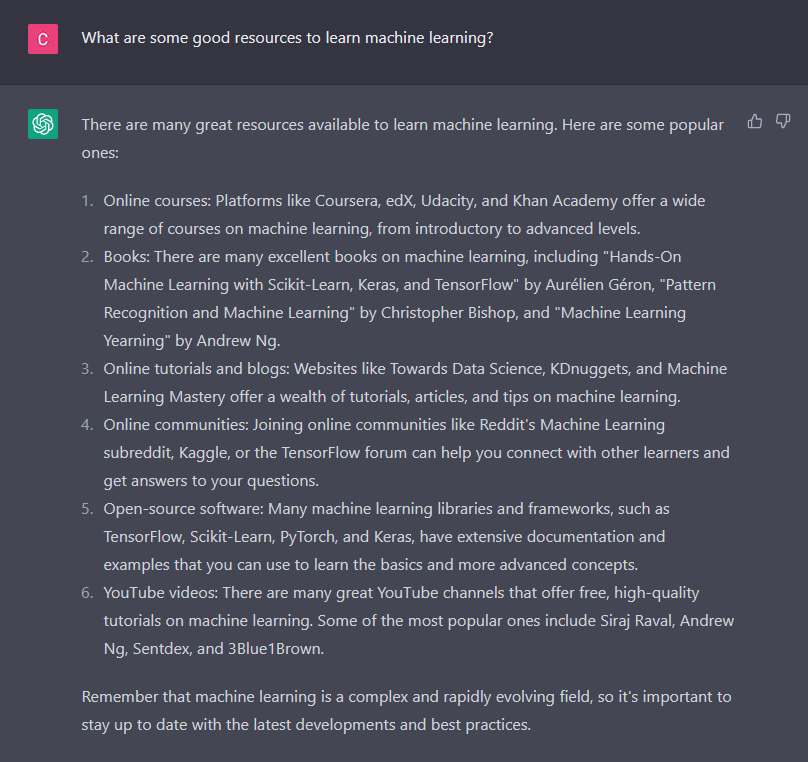
For example, if you want to improve your skills in machine learning, you can ask ChatGPT, “What are some good resources to learn machine learning?”
ChatGPT will provide you with a list of resources, such as online courses, books, and tutorials, to help you learn and practice concepts and libraries libraries.
Code Simplification
Complex code can be difficult to read and maintain.
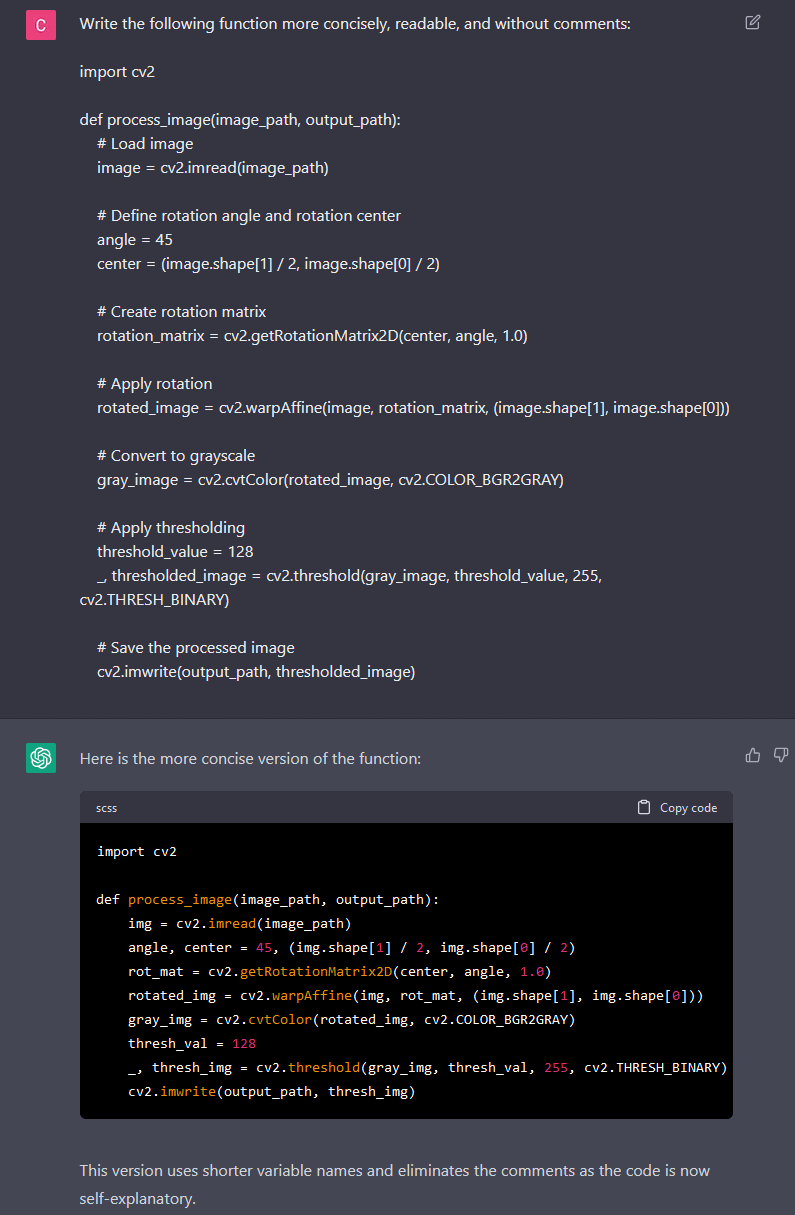
ChatGPT can help you simplify your code by suggesting more concise and efficient code snippets.
By simplifying your code, you can reduce the chances of introducing bugs and make it easier to understand and modify.
To use ChatGPT for code simplification, simply type in your code and wait for ChatGPT to suggest more concise and efficient code snippets.
You can then modify your code to use these snippets.
Conclusion
In conclusion, ChatGPT is an excellent tool for improving your coding skills.
It can help you ask questions, receive feedback on your code, and provide you with programming exercises to practice and improve your skills.
By using ChatGPT, you can become a better programmer and stay ahead in the rapidly evolving world of programming.
Whether you’re a beginner or an experienced coder, ChatGPT can help you improve your skills and achieve your programming goals. What I read in 2022. Reading is a great way to expand your knowledge, learn new things, and relax after a long day. This year, I had the opportunity to read a number of interesting and informative books. In this blog post, I want to share some of my favorites with you and wrote a bunch of Whether you’re looking for a good read to pass the time or some inspiration to help you achieve your goals, I hope you’ll find something in this list that interests you. by Chris Voss and Thal Raz “Never Split the Difference” is a book by former FBI hostage negotiator Chris Voss that teaches you how to effectively negotiate in any situation. Voss draws on his experience negotiating with terrorists and criminals to provide practical advice on how to get what you want in any negotiation. One key concept Voss discusses is the importance of empathy in negotiations. He advises to try to understand the perspective of the other party and to listen actively to their concerns. He also suggests using open-ended questions to gather information and to avoid making assumptions about the other party’s motivations. Another important aspect of successful negotiation, according to Voss, is the use of tactical empathy. This involves using empathy to build rapport with the other party and to identify their underlying needs and concerns. By understanding the other party’s perspective, it is possible to find mutually beneficial solutions to conflicts. Voss also advises to be willing to walk away from a negotiation if it is not possible to reach an agreement that is satisfactory to both parties. He emphasizes the importance of setting clear boundaries and being prepared to walk away if necessary. Overall, “Never Split the Difference” is a valuable guide for anyone looking to improve their negotiation skills. By following Voss’s practical advice and using empathy and tactical empathy, you can learn to negotiate effectively and get what you want in any situation. Bonus: Voss about the book with “Talks at Google” by John Doerr & Kris Duggan “Measure What Matters” is a book by John Doerr that discusses the importance of setting clear and specific goals in order to achieve success. The book introduces the concept of “Objectives and Key Results” (OKRs), which is a goal-setting framework used by companies such as Google, Intel, and LinkedIn. According to Doerr, OKRs can be used to drive innovation and achieve exceptional results. The framework consists of setting objectives, which are broad and ambitious goals, and key results, which are measurable and specific targets that help track progress towards the objective. Doerr shares stories and examples of how successful companies have used OKRs to achieve their goals. For example, Google used OKRs to set the ambitious goal of creating a self-driving car, which they eventually achieved. Intel also used OKRs to set the goal of creating a new microprocessor, which they were able to successfully develop and launch. In addition to sharing success stories, Doerr also provides practical advice on how to implement OKRs in an organization. He recommends setting a small number of objectives, making them specific and measurable, and setting key results that are challenging but achievable. He also advises regularly tracking progress and adjusting goals as needed. Overall, “Measure What Matters” is a practical guide that helps you set and achieve goals through the use of OKRs. It encourages you to set ambitious goals and to regularly track your progress in order to achieve success. By using OKRs, individuals and organizations can drive innovation and achieve exceptional results. by Eric Schmidt & Jonathan Rosenberg “How Google Works” is a book by Eric Schmidt and Jonathan Rosenberg, former executives at Google, that provides insight into the company’s unique management style and business strategies. One key aspect of Google’s approach is its focus on innovation and continuous improvement. The company encourages its employees to take risks and to constantly strive for better ways of doing things. Google also values data-driven decision making, using data and analytics to guide its business decisions. Another important aspect of Google’s management style is its emphasis on hiring and developing top talent. The company looks for individuals with a strong work ethic, creativity, and the ability to learn and adapt. Google also values diversity and encourages its employees to bring their unique perspectives and experiences to the table. In addition to discussing the company’s management style, the book also provides practical advice for businesses on topics such as strategy, innovation, and leadership. Schmidt and Rosenberg share insights from their experiences at Google and offer suggestions for how other companies can adopt similar approaches to achieve success. Overall, “How Google Works” is a valuable resource for anyone interested in learning about Google’s unique management style and business strategies. The book provides insight into the company’s approach to innovation, talent development, and data-driven decision making, and offers practical advice for businesses looking to achieve success. by Sheila Jasanoff “The Ethics of Invention: Technology and the Human Future” is a book by Sheila Jasanoff that explores the ethical implications of technological innovation. Jasanoff argues that as technology continues to advance at a rapid pace, it is important to consider the potential consequences of new inventions and to think critically about the values that guide their development. A key aspect of Jasanoff’s argument is the idea that technology is not neutral, but rather it reflects and reinforces the values of those who create it. She suggests that by considering the ethical implications of new technologies, we can ensure that they are developed in a way that is aligned with our values and promotes the greater good. Jasanoff also discusses the role of science and technology in shaping society and the ways in which they can be used to address social and environmental challenges. She argues that it is important to involve a diverse range of stakeholders in the process of technological innovation, in order to ensure that the technology is developed in a way that takes into account the needs and concerns of all members of society. Overall, “The Ethics of Invention: Technology and the Human Future” is a thought-provoking book that encourages readers to think critically about the ethical implications of technological innovation. By considering the values that guide the development of new technologies and involving a diverse range of stakeholders in the process, we can ensure that technology is used to promote the greater good and benefit society as a whole. by Michael Lewis “Flash Boys: A Wall Street Revolt” is a book by Michael Lewis that tells the story of a group of individuals who set out to expose and fix the unfair practices of the stock market. The book begins by introducing the concept of high-frequency trading, a practice in which firms use advanced computer algorithms to buy and sell stocks at lightning-fast speeds. This allows them to gain a significant advantage over other traders and to make large profits. However, as Lewis explains, this practice also creates a number of problems, such as reducing transparency and fairness in the market and increasing the potential for market manipulation. The book follows the story of Brad Katsuyama, a former trader who becomes convinced that the stock market is rigged against ordinary investors. Along with a team of colleagues, Katsuyama sets out to create a new stock exchange that is designed to level the playing field for all investors. “Flash Boys” is a fascinating and eye-opening look at the inner workings of the stock market and the ways in which it can be manipulated. It tells the story of a group of individuals who are fighting to create a more transparent and fair financial system and encourages readers to think critically about the ways in which the market operates. by Micheal Crichton “Jurassic Park” is a science fiction novel by Michael Crichton that tells the story of a group of scientists who are invited to visit a remote island where a wealthy (life sciences) businessman has created a theme park featuring living dinosaurs that were brought back to life with ancient DNA. While the book has quite a bunch more facets and characters than the movie version, it is also from where the inspiration for later movies and scenes came, which were often chapters cut from this book. The story begins when John Hammond, the owner of the park, invites paleontologists Drs. Alan Grant and Ellie Sattler and mathematician Dr. Ian Malcolm to visit the island and evaluate the safety of the park. Despite initial hesitation, the scientists agree to visit the island and soon find themselves caught up in a thrilling adventure as they encounter a variety of prehistoric creatures, including velociraptors and a Tyrannosaurus rex. As they explore the island, the scientists begin to uncover the dark secrets of the park and the dangers of playing God by bringing extinct species back to life. They must find a way to survive and escape the island before it’s too late. “Jurassic Park” is a thrilling and action-packed novel that explores the ethical implications of scientific innovation and the dangers of playing with forces beyond our control. It is a must-read for fans of science fiction and adventure and anyone who wants to go beyond the movie. Papers discussed, authors interviewed, stuff reported (shades required). Let’s face it. You are busy at work or doing your own research. Obviously you don’t have time to read the majority of academic research papers and even high profile papers originating from major technology companies. Luckily, there are AI/ML researchers like Yannic Kilcher who summarize and digest the latest developments in open source tooling, AI companies, model releases, and landmark papers. https://www.youtube.com/c/YannicKilcher Who is Yannic Kilcher? Distributed Warehouse Analysis… Go! PySpark can do Pandas-like DataFrame operations, transformation, and ML modeling. The advantage of Spark is that the instructions get sent out to a cluster that divides the DataFrames into segments, processes them in parallel, and then merges the result back together. A Spark cluster (made up of nodes) can have much more memory (RAM) than a single machine, which enables processing of vastly larger data sets. Spark DataFrames are data objects that can be partitioned for submitting to the differnt nodes of a Spark cluster. The number of partitions can be set when creating a DataFrame. Spark uses ‘Lazy Processing’. This means: A good start for PySpark is delivered here in the official “Getting Started” guide. The SparkContext is the connection to the cluster. The SparkSession is the interface with that connection. Name: pyspark-shell The cluster consists of one driver node and one or more worker nodes. Driver TCP port: 41309 Default number of partitions is 200. Number of DF partitions before: 200 Number of DF partitions after: 400 Partition table by ‘part’ column values: The ‘chapter’ column has 12 integer categories. Repartition DataFrame into 12 partitions on ‘chapter’ column. 12 All DataFrames are temporary at this point. Shortcut version Long version with extra options When reading without schema, the data type gets inferred and may be incorrect, and it takes more time to read. For optimal speed, create schema. Pass options to remove invalid rows: .options(mode=’DROPMALFORMED’) [(‘brand’, ‘string’), (‘model’, ‘string’), (‘absorption_rate’, ‘tinyint’), (‘comfort’, ‘tinyint’)] Show the columns in a DataFrame and their data types. Shortcut version Long version with extra options After registering the table, we can run .sql() methods with queries against it. Load file to DataFrame, register table, then query the table. The average film time is: 88 [Table(name=’my_sqltable’, database=None, description=None, tableType=’TEMPORARY’, isTemporary=True)] All null values in column ‘comfort’ will be filled with default value “4”. Spark DataFrames are immutable. We need to overwrite the old DF. That means creating new column based on old column Keep specified columns only. The SQL expression is passed as string. Overwrite original DF. ‘worked_df.withColumnRenamed(“old_name”, “new_name”)’ Group by month and destination, calculate average departure delay of the groups. String and Boolean column both produce the same results. Similar to SQL’s ‘WHERE’ clause. Filter for flights with origin PDX and select minimum distance Filter for all flights with origin SEA and select maximum air time Filter carriers for Delta (DL) and origin SEA then calculate average air time (flight duration) Duration hours (divide by 60 mins) and sum up entire column Aggregate three columns of the purchased df and alias two of them. String to upper case Split Strings .agg() and F.stddev The are IDs generated as Int64, contain gaps (non sequential), but retain parallelization across a cluster. Important Note: DataFrames with many partitions will get much more more digits in the IDs. We can wrap one of your own Python functions into a udf() and apply it to a Spark DF’s column. Add a column with random numbers for workers with the title engineer using .when() Add a column with multiple chained .when() clauses. The role of ‘else’ in Python is taken by .otherwise(). Creating local caches for DataFrames that get called repeatedly can help improving speed. Counting 319532 rows took 2.255696 seconds Counting 319532 rows again took 0.404590 seconds Is workers_df cached?: True \ Is workers_df cached?: False Broadcasting distributed the entire dataframe that is selected to all workers. This can expedite up join commands. Number training: 4602 Number test: 1128 Training iteration: 25 Return a summary object. 0.8783 The prediction will create a ‘prediction’ column anda a ‘probability’ column (probability false pred, probability true pred). By default, the probability threshold is 0.5 to make a prediction. Creating a pipeline can simplify and formalize preprocessing of training data and the ML model training. Using them avoids mistakes in repetition. https://spark.apache.org/docs/3.1.2/ml-pipeline.html#pipeline-components Create a pipeline from a workflow such as this: ‘double’ = double precision float ‘integer’ = integer StringIndexer() takes a column’s strings and converts it to categorical integers ‘1’, ‘2’, ‘3’, ‘4’…. https://spark.apache.org/docs/latest/ml-features#stringindexer OneHotEncoder() takes a categorical numbers and expands it into category columns and ‘1’ / ‘0’ categories. https://spark.apache.org/docs/latest/ml-features#onehotencoder Before running ML training, all feature columns need to be converted to a single vector column. https://spark.apache.org/docs/latest/ml-features#vectorassembler The Pipeline “stages” argument holds a list of all the stages the data goes through. All these stage objects have to be defined beforehand and now are brought in order. https://spark.apache.org/docs/latest/ml-features#vectorassembler The pipeline now gets applied with fit and transform. The DataFrame gets passed as argument to both. IMPORTANT: split after the StringIndexer ran, otherwise the train and test sets may end up with different codes for the same category. Train: 60%, Test: 40% Is it your cup of tea? Preamble: I explicitly state that this post is not intended to convince anyone to get a Ph.D. I try to enumerate some common considerations below. First, should you want to get a Ph.D.? I was in a fortunate position of knowing since when I started my M.Sc. research that I really wanted a Ph.D. Unfortunately it was not for very well gauged and pondered considerations: First, I really liked grad school and learning things, and I wanted to learn as much as possible. Second, I met a many industry Ph.D. who thrived in an industry that is now riding into the sunset. Third, in academia I was surrounded by Ph.D.s and it is taken for granted that you will get a Ph.D. If you are more thorough in making your life’s decisions, What should YOU do? Many books exist and many a Ph.D. graduate has written about the topic. For example some of the points below were taken from Justin Johnson’s post at Quora: I got a job offer from Google, FB, and MS and laso got accepted into the Ph.D……. Another great Quora threat is: Quora: What is the purpose of doing a Ph.D.. And of course there are many, many subreddits such as r/PhD or many specific career subreddits that often discuss the topic daily. Assuming that if you are not opting for a Ph.D., another choice for you to consider is joining a medium-to-large company. Ask yourself if you find the following attributes attractive: A Ph.D. is an intense experience of rapid growth -> You soak up knowledge like a sponge. It is a time of personal self-discovery during which you will become a master of managing your own psychology. Many Ph.D. programs offer a high density of exceptionally bright people who have the potential to become your Best Friends Forever. A Ph.D. is probably your only opportunity in life to really delve deeper into a topic and become a recognized leading authority at something within the scientific discourse. You are exploring the edge of humankind’s knowledge, without the burden of lesser distractions or constraints. There is something poetic about that and if you disagree, it could be a sign that Ph.D. is not for you. The research you produce will be yours as an individual and papers with you as first author. Your accomplishments will have your name stamped on them. In contrast, it is much more likely to disappear inside a larger company. A common sentiment is becoming an insignificant member in an anonymous apparatus, a “cog in the machine”. Few people make it into top Ph.D. programs. You join a group of a few hundred distinguished individuals contrasted by a few tens of thousands that will join private industry without Ph.D. While many people in industry tend to belittle Ph.D.s (i.e., “You will work on the matter of a whole Ph.D. every three months in here…”), working towards and eventually getting a Ph.D. degree is societally honored and recognized as an impressive achievement. You also get to be a Doctor; that is great. As a Ph.D. student/candidate you will be your own leader. Bad night and slept in? That works. Skip a day for a vacation? No problem. It is like these companies that have give limitless days off. All that matters is your result and no-one will force you to clock in from 09:00 to 17:00. Some profs (i.e., advisers) might be more or less flexible about it and some companies might be as well. For cutting-edge subjects that just make it out of academia into industry, there is no penalty for obtaining a Ph.D., since you know the latest techniques or even created them. Employers pay big bucks for your talent and brains to invent the next quantum computer etc. For more mature subjects where less revolutionary research happens, lower degrees may be prefered. So if you join a Ph.D. program in a cutting-edge subject, it does not close any doors or eliminate future employment/lifestyle options. You can go from Ph.D. to Anywhere but not the other way Anywhere to Ph.D./Academia/Research. Additionally, it is less likely to get a non-Ph.D. job in academia. Additionally (although this might be quite specific to applied subjects), you are strictly more hirable as a Ph.D. graduate or even as an A.B.D. and many companies might be willing to put you in a more interesting position or with a higher starting salary. More generally, maximal choice for your future is a good path to follow. You are young and there is really no need to rush. Once you graduate from a Ph.D. you can spend the next tens of years of your life in some company. Choose more variance in your experiences, which will avoid getting pigeon-holed. A Ph.D. will offer you a lot of freedom in the topics you wish to pursue and learn about. You are in charge. Of course, you will have an adviser who will guide you in a certain direction but in general you will have incredible freedom working on your degree than you might find in industry. Photo by @emilymorter on Unsplash While the points above sound neutral to positive, it cannot go unsaid that the Ph.D. is a very narrow and specific kind of experience that deserves a large disclaimer: You will inevitably find yourself working very hard for qualification exams, before conference talks, or submission of the written part near graduation. You need to be accepting of the suffering and have enough mental stamina and determination to deal with the pressure that comes with these crunch times. At some points you may lose track of what day of the week it is and temporarily adopt a questionable diet. You will be tired, exhausted, and alone in the lab on a beautiful, sunny weekend looking at Facebook posts of your friends having fun in nature and on trips, paid with their 5-10 times bigger salaries. It could happen that you will have to throw away months of your work while somehow keeping your mental health intact. You will live with the fact that months of your time on this Earth were spent on a journal paper that draws limited interest (citations), while your friends participate in exciting startups, get hired at prestigious companies, or get transferred to exotic locations only to become manager over there. You will experience identity crises during which you will question your life’s decisions and wonder what you are doing with some of the best years of your life. As a result, you can be certain that you can thrive in an unstructured environment in the chase for new discoveries for science. If you are unsure then you should lean towards other pursuits. Ideally you should consider dipping your toe into research projects as an undergraduate or Masters student before before you decide to commit. In fact, one of the primary reasons that research experience is so desirable during the Ph.D. hiring process is not the research itself, but the fact that the student is more likely to know what they are committing to. Lastly, as a random thought I read and heard that you should only do a Ph.D. if you want remain in to academia. In light of all of the above I would argue that a Ph.D. this is an urban myth and that the Ph.D. has strong intrinsic value of great appeal to many. It is an end by itself, not just a means to some end (e.g., career in academia). Photo by @homajob on Unsplash Now how do you get into a good Ph.D. program? The very first step to conquer is quite simple - the by far most important component are strong reference letters. The ideal scenario is that your professor writes you a glowing letter along the lines of: “X is in top five of students I have ever worked with. X takes initiative, comes up with their own ideas, and can finish a project.” The worst letter is along the lines of: “X took my class. They are a good student/did well.” That may sound good at first sight, but by academic conventions is not good enough to impress anyone. A research publication under your belt from a class project (or similar) is a very strong bonus and may often be requested in the application process. But it is not absolutely required, provided you have two/three strong reference letters. In particular note: grades are quite irrelevant, and do not have to be stellar. But you generally do not want them to be out of the usual low. This is not obvious to many students, since many spend a lot of energy on getting good grades, which is a diminishing returns problem. This time spent should be instead directed towards research and thesis work as much and as early as possible. Working under supervision of multiple professors lets them observe your work ethic and skills so that they can confidently write reference letters. As a last point, what will not help you too much is making appearances in the profs offices out of the blue without (recurring?) scheduled meeting times. They are often very busy people and if you do not adhere to appointment schedules, then that may lead to doors closed in your face and even worse, that may backfire on you. Once you get into some Ph.D. programs, how do you pick the school? Your dream university should: …be a top university. Not only because it looks good on your résumé and CV but because of less obvious feedback loops. Top universities attract other top students/professors, many of whom you will get to know and work with. …have a hand full of potential professors you would want to work with. I really do mean a hand full - this is very important and provides a safety net for you if things do not work out with your top choice for any one of dozens of reasons - things in many cases outside of your control, e.g., your dream professor leaves, moves with all the lab equipment but without students, retires, dies (I have seen it a couple of times), has Title IX issues, or spontaneously disappears …be in a good environment physically. I do not think new students appreciate this enough: you will spend ~5 years of your really good years living in a city that best not be a place you do not really enjoy. Really, this is a long period in your life. Your time in this city consists of much more than just your research and work. To be continued… Are we done with labeling yet? This is my personal summary from reading Self-supervised learning: The dark matter of intelligence (4th March 2021), which was published on the Facebook AI blog https://ai.facebook.com/blog/. This department at Facebook is dedicated to applied research, but also assembles smart scientists that undertake relatively basic, but ground-braking research. The article is offering an overview of Facebook’s AI-frontier research on self-supervised learning (SSL) in the wake of other papers published by Facebook in the same month DINO and PAWS: Advancing the state of the art in computer vision. Supervised models are specialized on relatively narrow tasks and require massive amounts of carefully labeled data. As we want to expand the capabilities of state-of-the-art models to classify things, “it’s impossible to label everything in the world. There are also some tasks for which there’s simply not enough labeled data […]”. The authors postulate that supervised learning may be at the limits of its capabilities and AI can develop beyond the paradigm of training specialist models. Self-supervised learning can expand the use of specialised training sets to bring AI closer to a generalized, human-level intelligence. Going beyond a specialized training set and forming a common sense from repeated trial-and-error cycles is in essence what humans and animals do. Humans learn without massive amounts of teaching all kinds of possible variants of the same but rather build upon previously learned input. This common sense is what AI research is aspiring to when referring to self-supervised learning and what has remained elusive for a long time. The authors call this form of generalized AI the “Dark Matter” of AI: it is assumed to be everywhere and pervasive in nature, but we can’t see or interact with it (yet?). While SSL is not entirely new. It has found widespread adoption in training models in Natural Language Processing (NLP). Here, Facebook AI uses SSL for Computer Vision tasks and explains why SSL may be a good method for unlocking the “Dark Matter” of AI. Self-supervised learning is trained by signals from the data itself instead of labels. The data in the training set is not a complete set of observations (samples) and thus the missing parts are predicted using SSL. In an ordered dataset such as a sentence or a series of video frames, missing parts or the future/past can be predicted without the use of labels. Since training signals are originating from the dataset itself, the term self-supervised learning is more fitting than the older term “unsupervised learning”. The authors argue that self-supervised learning uses more supervision signals than both supervised and reinforcement learning. In Natural Language Processing, a model is trained by showing it long texts - but no labels. These models are pretrained in a self-supervised phase and then fine-tuned for a use case, such as classifying the topic of a text (see sentiment analysis etc.). When given a sentence with blanked out words, the model can predict the “correct” words. The same concept was tried to apply towards Computer Vision (CV) but so far has never shown the same improvements as in NLP. A large challenge to overcome is the expression of uncertainty for predicted gaps in CV, which was relatively easy in NLP. That is because NLP always works with a finite vocabulary and each word can be given a probability value. Having to design a model for CV requires incorporating accurate representations of errors, which used to be costly in computation and memory. In the past, Facebook’s FAIR workgroup designed a new architecture of Convolutional Networks called RegNet (Regular Network) that solves this issue and efficiently stores billions/trillions of network parameters. It is still impossible to assign error to an infinite number of possible missing frames or patches within a frame, since we do not have a vocabulary as in NLP. However, efficient SSL techniques such as SwAV are improving vision-task accuracy using billions of samples. Photo by @priscilladupreez on Unsplash During NLP’s prediction process the uncertainty is expressed with a softmax function across the entire vocabulary. That means the sum of all vocabulary probabilities add up to 1.0 and the most likely word gets the highest probability assigned. In CV, a frame or patch in a frame out of infinite possibilities is predicted instead of NLP’s discrete vocabulary. We may never be able to assign prediction scores to infinite frames of a high-dimensional continuous space or find techniques to solve this problem. Self-supervised models can be viewed within the framework of energy-based models (EBM). For this model, Siamese networks use two identically architected deep neural networks with shared parameters that encode two images. The networks calculate the two image embeddings, which are compared with each other. The networks are trained to produce low energies, which makes it sometimes difficult to calculate high energies when needed for different images. Several techniques exist to avoid the network to produce very similar embeddings for every sample, which is called “collapse”. Photo by @mrcageman on Unsplash Latent-variable models can be trained with contrastive methods. A good example of contrastive models is the Generative Adverserial Network (GAN) architecture. In SSL, selecting well-chosen pairs of As desribed above, NLP problems are easier to tackle with its finite vocabulary. A latent-variable predictive architecture can be given an observation However, it is very difficult to find maximally incompatible pairs of images (high-dimensional data). So, how could it be possible to increase energy for incompatible candidates? This is a very actively researched field in SSL and are divided into two groups: However, the authors hypothesize that it may be beneficial in the future to combine non-contrastive models with latent variables. Future research will focus on top performing models without requiring large amounts of labeled data. Photo by @vork on Unsplash A new network was trained at Facebook AI called SEER that may bring about a paradigm shift in CV: Supervised learning is at the forefront of everyone’s attention today. Self-supervised methods have been restricted to certain niches such as NLP, where predictions were descrete and finite. Current challenges with bringing Self-supervised methods to CV requires solving problems of calculating probabilities for infinite continuous, hyperdimensional predictions. Siamese networks trained on non-contrasting data is current state-of-the-art to avoid endless training of supervised networks. Facebook released a new, open-source network called SEER that outperforms any other self-supervised network after it was pre-trained on random, un-labeled images. I accidentally dropped a table. Not. Database tables are split up into sub-tables to avoid saving redundant records. This requires the maintenance of more complex systems, but it may be more efficient after all. However, while querying and joining we can combine these tables again. This post contains a number of SQL used for managing values, columns, tables, and databases. Of course, the original tables and outputs are not available here, but the point is providing a lookup for structures and building blocks. New tables can be created directly in SQL syntax. For example: Most common Data Types: PostgreSQL Documentation: DataType table Delete the entire table. List all foreign Keys For Example: For Example: Use DISTINCT to remove duplicate records. Similar as INSERT INTO column, but with additional conditoins. Delete rows selectively where conditions are met. Have you made a type when creating a table? Delete a column in a table. After creation, the datatype of a column can still be modified. Extension of a string lenghth is easy. Shortening the length of a value requires a processing step first. For example, a float type gets rounded first and then cast to integer type. For example, when shortening string entries,a ‘SUBSTRING’ has to be created first selecting the characters from 1 to x. By default, a colum can contain NULL values. A column’s ‘NOT NULL’ flag can be set after the table was created. Remove ‘NOT NULL’. Note: The unique constraint will require a new column be created. Add a primary key serial type. Generate a foreign key column that references a primary key in another table. Assuming a star pattern schema, the central table will get a foreign key added to an central_table_id that refernece the branch_id. For example: Inserting entries into the employees table that violate the foreign key table, e.g. non-existing company, will result in error. Drop / Delete a Foreign Key Column This is two foreign key columns referencing other tables in a many to many relationship. Foreign Keys referencing other tables can be used to prevent entering or deleting data that is not given/referred to in the other table. We can determine what happens to the referenced table if an entry of our foreign key gets deleted. Example: NO ACTION If you delete an entry in table b, the system will raise an error. Example: CASCADE If you delete an entry in table b, all referencing entries in table a will be deleted, too. Use after INSERT, UPDATE, DELETE data manipulation. The tables ‘deleted’ and ‘inserted’ are automatically created by SQL Server. Example 1: AFTER DELETE Example 2: AFTER INSERT, UPDATE The ‘inserted’ is used for both ‘INSERT’ and ‘UPDATE’. Example 3: After INSERT, execute e-mail sending script. Example 4: Differentiate UPDATE and Insert with CASE Write changes into a ClientAuditTable Use instead of INSERT, UPDATE, DELETE data manipulation. Example 1: Instead of updating, raise an error message and send a push email. Example 2: Instead of inserting, check first if condition is met, then resume insert FOR triggers can only be run after, not instead of. That means ‘FOR’ is a synonym for ‘AFTER’. It is impossible to prevent server or database events with ‘INSTEAD OF’, however they can be rolled back with ‘FOR’ The ‘DATABASE’ level includes all tables in the database. Roll back a database-level event with ‘FOR’. Roll back a server-level event with ‘FOR’. Server-level triggers: Database + Table-level triggers (see column ‘parent_class_desc’): Example: Show all disabled triggers The name of a specific trigger has to be known and then can be entered as object_id. Method 1: Method 2: On table level: On database level: On Server level: ‘ALTER TRIGGER’ Altering triggers works with the same syntax as ‘CREATE TRIGGER’, but combines the dropping and creating of a trigger in one step. The ultimate process does not exist. Only compromises. For starting a career as Data Scientist (or moving laterally, pivoting) you need to go through interviews such as for any other role. Either way, Data Science has its very own rules, pitfalls, and pre-conceptions that are hard to navigate. Sometimes, the process is more similar to Software Engineering, sometimes closer to Business. Candidates/applicants want to know what is special about a Data Science interview. Hiring managers want to know which is the right or wrong way to interview. Having had conversations with friends and family in the technology sector, linkedin.com, anonymous platforms such as reddit.com, and teamblind.com, I came to the conclusion that there is no universally right way to interview. This is super important for both hiring managers and candidates to understand. Why? It is all about making compromises. There are no absolutes: Shorter, more succinct interview processes introduce a higher risk of hiring the suboptimal candidate. Longer, more in-depth interview processes, introduce a higher risk of false negatives (i.e., rejecting a candidate who would actually be great for the role), and a higher risk of just rejecting qualified applicants. A strong focus on quizzes / coding tests / quick reaction questions / take-home assignments can introduce a high risk of giving good scores to applicants who either prepared super well how to interview or simply got lucky and knew the answers to those specific questions. Focusing instead only on their work experience introduces a high risk of hiring someone who cannot improvise. Having said that, in my experience there are a couple of universal facts in a statistical sense that really help with interviewing: A history of continuously being productive is with high likelihood an indicator for being productive in the future. Applicants with a history / résumé that lack productivity are unlikely to become productive in a new role. This is, of course, a relatively sweeping judgement, I know. Let me explain. Many candidates look great on paper, had the right classes, know the right things, talk convincingly about their abilities… – but for some reason, when they get hired, would struggle to get things done. Everything would take too long, people overthink things, don’t know when to ask for help, etc. And that is when the red flags showed up (retroactively): The candidates knew all the facts, but had never produced output. Whether in grad school (publications, projects,…) or at work. The ratio of productivity/knowledge is out of balance. According to some people, this is mostly an inherent trait. Some candidates just find ways to get things done, and other candidates find ways to NOT get things done. Many people believe that there is very little you can do as a manager to change that in a person. This leads to the realization that if a candidate who aces every part of the interview but has nothing to show for in his previous roles becomes a concern - unless they have an explanation as to why. Most of the time there is no satisfactory reason why. Hiring managers: Focus on evidence of productivity in candidates. Candidate: Make your résumé scream “I will get stuff done”. Achievements outweigh knowledge. Photo by @magnetme on Unsplash Everyone is going to be compared against a benchmark, but the benchmarks are different. Someone fresh out of a Masters degree is going to get graded on a different scale than someone with two years of experience. But either way, the candidate needs to look productive relative to their peers. Candidates do not need to provide excessive detail to show they were productive. Ideally, a candidate can write/say something along the lines of “Delivered $2M in revenue by implementing a [some ML] model in [language]”. If a professional candidate is not allowed to disclose those details, they can remove the quantities and keep it vaguer. What’s critical is that they provide a cumulative list of projects / impact that looks compelling. If the candidate has worked for an employer for two years, they need to either have one to two really impressive accomplishments, or four to six more moderate/minor ones. They need a combination of volume and impact that stands out. Something candidates often miss: it is not good practice to combine or aggregate multiple projects (e.g., “Delivered $[x]M in value across several projects”). Instead, listing every single project is likely to be more successful. Do not say/write things such as “Collaborated on several cross-department initiatives”. List every single one and what was accomplished in them – even if minor. For example, compare these two lists: vs. Generated $[xxx]K in costs savings by optimizing ad spend across channels using a linear programming approach. Identified $[xxx]K in additional revenue opportunities through targeted price increases. Mitigated COGS increases of [x]% by consolidating volume across multiple brands. Helped leadership identify $[xx]K in redundancies by providing ad-hoc analysis to identify redundancies. What would you prefer as hiring manager? Conversations with DS hiring managers yielded that they are almost surely going to prefer the second list, because it tells them the candidate has generated value in many different ways and times. That means more evidence that proves “I can accomplish things”. As a fresh graduate, it is critical is to make sure to cover all papers, reports, documents, projects, etc. Descriptions to avoid are: And instead break that down into details: Performed literature review (>20 manuscripts) in [something] design, [type of] algorithms and [something] optimization. Conducted weekly research meetings with researchers in the Department of [something]. Prototyped novel model using combination of [language] and [framework]. Delivered monthly status updates to advisor. Focus on detailed accomplishments and results. If possible, provide numbers. Photo by @casparrubin on Unsplash While it is a platitude, it is still a universal truth: “The only constant in workplaces is change.” For many hiring managers very high on the priority list is finding out if someone can learn exactly those things quickly they will need them to do now and in the future. Other hiring managers ask themselves “What would this person do today?”, and then focus on finding people who are doing exactly those things today. If the applicant pool is large (e.g., the manager needs them to code in [language]), then it is a reasonable approach to be very specific. However, if the candidate pool is small (e.g., they need people with experience in one specific algorithm), then things become difficult. This is because the odds of finding someone who is both an excellent interviewee and has that exact experience is miniscule. This is where the search principles come back to the productivity history screening. Hiring managers should put more emphasis on finding productive people than finding people with the exact experience they want. Why? Experience can be acquired. People can learn. Not only that, what they may have to do today may not be what they will be doing half a year in the future. Perhaps that new employee comes in and they themselves are able to suggest a new approach that works better than what was done before, rendering that skill set obsolete. A candidates’ current skill set is largely dictated by their current job, and should not be taken as a fixed, static skill set. When hiring managers consider candidates that have been in a single environment for several years, then they look at the résumé and assume that what the candidate is doing now is just who they are. “Well, this applicant has done a lot of reporting as Data Analyst - not what I we are looking for. We need a Data Scientist building [some type of] models.” And that is the wrong approach. Because what all this indicates is that candidate is doing reports, which is what they need to do in order to do their current job well. So, what can a hiring manager do with a candidate that has done mostly Data Analysis-work but wants a position as Data Scientist training models? Answer: Measure productivity. If the applicant’s previous job was data analytics reporting, then how successful were they at that? Did they differentiate themselves in that field? Did they go above and beyond what others would have done in the role? What experience does the applicant have with modeling - not in this previous role, any time before? How well can they describe that experience? How willing are they to return to it? What experience does the applicant have picking up new skills? In their current role, did they have to learn new technologies or languages? Hiring managers can take the risk-averse position and not even entertain the thought of hiring someone without the exact résumé and experience they are looking for. But they are overwhelmingly likely to miss out on some great candidates. The Unix shell tricks for the Command Line Interface The following writeup contains general bash knowledge I have written down over the years and finally decided to translate into markdown. More flags and examples are found in the internets. Globbing is using wildcards to select multiple files and is similar to regex (see below). Gzipping deletes the original, gunzipping deletes the zipped file Compression levels 1 = weak, 9 = strong Access files while they are still compressed Bzip2: Gzip: Xy: Crating a tarball archive c = create, f = filename View contents of tarball t = view Add/update file to exiting tarball archive (only works uncompressed) u = update Extract tarball archive x = extract Extract single file of tarball archive x = extract with f = filename inside the tarball c = create, z = gzip, j = bzip2, J = xy, f = filename Unzipping .tgz zip r = recursively all subfolders Unlike the other file formats, zipping does NOT automatically delete the uncompressed file. unzip Alternative: Open crontab file with Example 1: Task: Run backup script on first day of each month at 21h. Example 2: Task: Run php script every day at 10 AM. Example 3: Task: Run every hour at minute 0. Crate/overwrite a text file with (string) output contents using Create/append a text file with (string) output contents using Create/overwrite a text containing error message using If no error occurs, nothing will be saved to text file. Create/append a text containing error message using Redirecting to ‘/dev/null’ bit bucket (suppress output) Input data to a command, from file instead of a keyboard. Used with commands that don’t accept file arguments. Translate delete letter l in text ; links commands together and runs sequentially. Inputs and outputs are separate. Redirect output to next input. Show contents of passwd file -> make page scrollable Show all files -> only top 10 -> word count only words -i case sensitive search -r recursive in subfolder files -c counts matches -v invert, show what NOT matches -E extended regex | + ? 1 All lines containing the word cat anywhere on the line. 2 All lines that do not contain (inverse) any of the following characters: sawgtfixk. 3 All lines that start with any 3 letters and the word dig. 4 All lines that end with at least one e. 5 All lines that contain one of the following words: org , kay or tuna. 6 Number count of lines that start with one or no c followed by the string ati. All scripts should begin with a shebang, which defines the path to the interpreter (#!/bin/bash). All scripts should include comments to describe their use (#…). Edit scripts with No spaces before/after = assigning variables. Call variable with $ before variable ($username). $# env. variable with count of arguments passed. $? env. variable with error codes (0=no error). $@ or #* env. variable containing ALL passed arguments. $1 - $9 = explicit call of positional parameters 1-9 Single quotes (‘ ‘). Literal interpretation (variable substitution won’t work). Double quotes (“ “). Variable substitution works. Example: “$var” -> varcontent. Back ticks ( Parenthesis method $(). Content gets fetched from a sub-shell. Example: var=“Today’s date is $(date).” Variables are always considered type=str -> math doesn’t work out of the box. Specify interpreter in first line of script -> comment with shebang! (bash folder) Add access permissions to script file + execute script Single quotes vs double quotes Hello Carol Smith! Hello $username! Script Arguments Input: Hello Carol and Dave! Number of Script Arguments ($#) Input: Hello Carol! Number of arguments: 2. Shell-within-a-shell calculation Converting temperature units (pass °F as parameter) Input: 28 Script creating variables from files Input: The three temperatures were 45, 22, and 32 Scalar comparison operators String Comparison Operators Example 1 If one argument is passed Input: Hello Carol! Number of arguments: 1. Example 2 Input: Apples win! Make your own exit codes and end script there Input: Output: Hello Carol! 0 Indsead of long chains of if/else-statements, case-statements are simpler to write. Feed in filename as script argument ($1) Feed in filename as script argument ($1) cat through the file contents and move or remove the files. Pattern: `for [indexing_var] in [iterable] do [something] done Example 1 Example 2 Loop through parameters and print each parameter Input: Output: Hello Carol! Hello Dave! Hello Henry! Example 3 Loop through parameters and check for alphabetical symbols Input: Output: Hello Carol! Hello Dave! Hello Henry! ERROR: Names must only contain letters. Example 4 A script that will take any number of arguments from the user, and print only those arguments which are numbers greater than 10. Example 5 A script combining for-loop and case-statements to sort files into folders based on contents or remove them. A function with no parameters gets set up with the keyword function and curly braces. Variables defined within a function are always in global scope, unlike other programming languages. Instead, they have to be declared as local. The return option is not for returning data, but for error codes (0 = no error, 1-255 = failure). To get data out of a function, the variable can be echoed and/or declared a global variable. Example 1 Example 2 However, it also works without the keyword. Arguments for functions are handled with The percentage is 745.45% csv kit can do csv processing similarl to Pandas data frames. Install using Python pip Print excel spreadsheet Print excel sheet names with flag -n Excel to csv Excel sheet to csv Print a csv like a markdown table. Similar to the pandas command Print column names with flag -n Print first, third, fifth columns by positional argument Print a column by name Add a group column that traces the original file with flag -g and a group name with flag -n Executes an SQL query on a large variety of SQL databases (e.g., MS SQL, MySQL, Oracle, PostgreSQL, Sqlite) and outputs result to csv. SQLite: starts with Postgres: starts with MySQL: starts with Use SQL syntax compatible with the database Write query in one line with no line breaks Applies SQL statements to one or more csv. Creates an in-memory SQL database that temporarily hosts the Suitable for small to medium files only The sql query must be written in one line without breaks. The order of files in the query and the csv files after that must match. Create tables and insert into tables. Start measuring, find bottlenecks. Writing code a programming language is very flexible. Many solutions will lead you to a goal. But not all the ways of are equally quick in computation and parsimonious in memory allocation. For many applications you won’t really bother with using speedier commands. However, this becomes a consideration when dealing with large datasets (aka Big Data) or you prefer to use serverless services that charge by computation time (e.g., AWS Lambdas). How do we find out what command is more efficient and what is less efficient? You can measure! Timeit: line magic ( Line_Profiler, a module that accepts a function and returns a line-by-line analysis how long each line took to execute and its proportion of overall time. A great way to find bottleneck commands in a function. Memory_Profiler, a memory that accepts a function (imported from a .py file) and delivers a line-by-line analysis of memory usage in MiB. If you want to know more about magic commands and code measurement, check out these articles: An example Jupyter Notebook with all the code of this post can be found here Line Magic Line magic is used for short one-liner measuring. For the first use, execute Default parameters: 44 ns ± 1.45 ns per loop (mean ± std. dev. of 7 runs, 10000000 loops each) Setting flags to set custom parameters for repetitions and number of runs: 40.9 ns ± 0.134 ns per loop (mean ± std. dev. of 10 runs, 1000 loops each) Cell Magic Cell Magic is used to measure multi-line scripts. The same flags can be set for cell magic. 3.33 ms ± 71.1 µs per loop (mean ± std. dev. of 7 runs, 100 loops each) The Line Profiler offers a total run time and additionally detailed measurements how much time each line took to execute, how many times it was executed, and what proportion of the total each line makes up. Use and settings of the Memory Profiler is very similar to the Line Profiler. The “Increment” column shows memory volume gained in each line. The Memory Profiler only works with functions that are imported from .py files in the working directory! If the function is too small to measure, it will show “0.0 MiB”. The decorator is used to automate the timing of a function and we do not have to repeat the timing logic over and over. slow_function took 10 seconds 17.8 ms ± 1.07 ms per loop (mean ± std. dev. of 7 runs, 100 loops each) 194 ns ± 1.06 ns per loop (mean ± std. dev. of 7 runs, 10000000 loops each) Summary: The zip function is multiple magnitudes faster than the loop. The Counter function is part of the ‘collections’ package. 12.4 ms ± 382 µs per loop (mean ± std. dev. of 7 runs, 100 loops each) 4.96 ms ± 26.1 µs per loop (mean ± std. dev. of 7 runs, 100 loops each) Summary: Counter takes only about a third of the loop. 1.98 s ± 23.3 ms per loop (mean ± std. dev. of 7 runs, 1 loop each) 724 ns ± 6.85 ns per loop (mean ± std. dev. of 7 runs, 1000000 loops each) Summary: The difference here is most staggering: almost two seconds for the nested loops and less than one millisecond for the function. 11.7 ms ± 128 µs per loop (mean ± std. dev. of 7 runs, 100 loops each) 8.95 ms ± 280 µs per loop (mean ± std. dev. of 7 runs, 100 loops each) What if you are having trouble with a function executing for longer than expected? You can have a timeout alarm set if it runs longer than a set duration of seconds. The example below makes use of a decorator factory that produced decorators with a variable time for the timeout (seconds). TimeoutError Reading in 2022

Introduction
Never Split the Difference: Negotiating As If Your Life Depended On It
Measure What Matters How Google, Bono, and the Gates Foundation Rock the World with OKRs
How Google Works
The Ethics of Invention Technology and the Human Future
Flash Boys: A Wall Street Revolt
Jurassic Park
Yannic Kilcher's ML News

ignite Spark tables
Create a Spark Session
from pyspark.sql import SparkSession

# Create spark session, avoid building a second session
my_spark_session = SparkSession.builder.getOrCreate()
Name of the Spark application instance
app_name = spark.conf.get('spark.app.name')
print("Name: %s" % app_name)
Driver TCP port
driver_tcp_port = spark.conf.get('spark.driver.port')
print("Driver TCP port: %s" % driver_tcp_port)
Number of Join and DataFrame Partitions
# Get settings, number of join partitions
spark.conf.get('spark.sql.shuffle.partitions')

# Get numbers of partitions of DataFrame
num_partitions_bef = workers_df.rdd.getNumPartitions()
print("Number of DF partitions before: %s" % num_partitions_bef)

# Change settings, number of join partitions
spark.conf.set('spark.sql.shuffle.partitions', 400)

# Reload DataFrame from file
workers_df = spark.read.csv('departures.txt.gz').distinct()

# Get numbers of partitions of DF again
num_partitions_aft = workers_df.rdd.getNumPartitions()
print("Number of DF partitions after: %s" % num_partitions_aft)
Partition SQL Table by Column values
query = """
SELECT
    part,
    LAG(word, 2) OVER(PARTITION BY part ORDER BY id) AS w1,
    LAG(word, 1) OVER(PARTITION BY part ORDER BY id) AS w2,
    word AS w3,
    LEAD(word, 1) OVER(PARTITION BY part ORDER BY id) AS w4,
    LEAD(word, 2) OVER(PARTITION BY part ORDER BY id) AS w5
FROM
    text
"""
spark.sql(query).where("part = 12").show(10)
repart_df = text_df.repartition(12,'chapter')

# Prove that repart_df has 12 partitions
repart_df.rdd.getNumPartitions()
Create Spark DataFrames and (SQL-like) Tables
Convert Pandas DF to Spark DF
# Create a pandas DF with random values
df_temp = pd.DataFrame(np.random.random(10))

# Feed the pandas DF into spark DF (SparkSession object is called "spark")
spark_temp = spark.createDataFrame(df_temp)

# The permanent Table catalog will be empty, the DF is only temporary
print(spark.catalog.listTables())
Create Temporary Spark DataFrame from CSV
file_path = "/usr/local/share/datasets/airports.csv"

# Read in the airports data
airports = spark.read.csv(file_path, header=True)

# Show DataFrame
airports.show()
# Load the CSV file
aa_dfw_df = spark.read.format('csv').options(Header=True).load('AA_DFW_2018.csv.gz')

# Add the airport column using the F.lower() method
aa_dfw_df = aa_dfw_df.withColumn('airport', F.lower(aa_dfw_df['Destination Airport']))

# Drop the Destination Airport column
aa_dfw_df = aa_dfw_df.drop(aa_dfw_df['Destination Airport'])

# Show the DataFrame
aa_dfw_df.show()
Create DataFrame with Schema
from pyspark.sql.types import *

# Define a new schema using the StructType method
schema = StructType([StructField("brand", StringType(), nullable=False),
	StructField("model", StringType(), nullable=False),
	StructField("absorption_rate", ByteType(), nullable=True),
	StructField("comfort", ByteType(), nullable=True)
])
df = spark.read.options(header="true", mode=’DROPMALFORMED’).schema(schema).csv("/home/repl/workspace/mnt/lake/inbound/ratings.csv")

pprint(df.dtypes)
from pyspark.sql.types import *

# Define a new schema using the StructType method
people_schema = StructType([
	# Define a StructField for each field
	StructField('name', StringType(), nullable=False),
	StructField('age', IntegerType(), nullable=False),
	StructField('city',StringType(),nullable=False)
])
DataType overview
DataType Value Type in Python ByteType() Numbers -128 to 127 ShortType() Numbers -32768 to 32767 IntegerType() Numbers -2147483648 to 2147483647 FloatType() Floating point number StringType() String BooleanType() bool (True, False, 0, 1) DateType() datetime.date View DataFrame schema
split_df.printSchema()
Save DataFrame to File
df.write.parquet('filename.parquet')
df.write.format('parquet').save('filename.paruqet')
DataFrames and SQL-like Tables
Register Spark DataFrame in SQL Table Catalog
# Add spark_temp to the catalog
temp_df.createOrReplaceTempView("my_sqltable")
SQL query against Spark table
# write a query string
query = "FROM flights SELECT * LIMIT 10"

# apply query string with .sql() method to the session object
flights10 = my_spark_session.sql(query)

# print results table in console
flights10.show()
year month day dep_time dep_delay arr_time arr_delay carrier tailnum flight origin dest air_time distance hour minute 2014 12 8 658 -7 935 -5 VX N846VA 1780 SEA LAX 132 954 6 58 2014 1 22 1040 5 1505 5 AS N559AS 851 SEA HNL 360 2677 10 40 2014 3 9 1443 -2 1652 2 VX N847VA 755 SEA SFO 111 679 14 43 Query SQL Table and save to Pandas DF
# write a query string
query = "SELECT origin, dest, COUNT(*) as N FROM flights GROUP BY origin, dest"

# apply query string with .sql() method to the session object
flight_counts = spark.sql(query)

# convert the results to a pandas DataFrame
pd_counts = flight_counts.toPandas()

# print results pandas DF
pd_counts.head()
long_films_df = spark.sql('SELECT * FROM my_sqltable WHERE filmduration >100')
# Read the Parquet file into films_df
films_df = spark.read.parquet('films.parquet')

# Register the temp table
films_df.createOrReplaceTempView('films')

# Run a SQL query of the average film duration
avg_duration = spark.sql('SELECT AVG(film_duration) from films').collect()[0]
print('The average film time is: %d' % avg_duration)
Describe an SQL Table
spark.sql("DESCRIBE schedule").show()
col_name data_type comment train_id string null station string null time string null List SQL Table Catalog
print(spark.catalog.listTables())
Column and Value Manipulation
Remove Missing Values in a Column with .fillna()
ratings = ratings.fillna(4, subset=["comfort"])
Categorization/binning of Column Values .withColumn() and .when()
from pyspark.sql.functions import col, when

categorized_ratings = ratings.withColumn("comfort", when(ratings.comfort > 3, "sufficient").otherwise("insufficient"))

categorized_ratings.show()
Creating new Columns / Computation with .withColumn()
# Create the DataFrame flights
flights = spark.table("flights")

# Show prints 20 rows
flights.show()

# Add new column ‘duration_hrs’ using method .withColumn()
flights = flights.withColumn("duration_hrs", flights.air_time / 60)
Select Columns with .select()
# string style
selected1 = flights.select("tailnum","origin","dest")

# boolean style
selected2 = flights.select(flights.origin, flights.dest, flights.carrier)
Drop Columns with .drop()
flights.drop("superfluous_column")
Select Columns and use SQL statements with .selectExpr()
speed_df = flights.selectExpr("origin", "dest", "tailnum", "distance/(air_time/60) as avg_speed")
Rename Columns I: .alias()
flights = flights.select((flights.air_time/60).alias("duration_hrs"))
Rename Columns II: .withColumnRenamed()
airports = airports.withColumnRenamed("faa", "dest")
Aggregation with .groupBy() and .min() .max() .avg()
flights.groupBy("month", "dest").avg(“dep_delay”).show()
month dest avg(dep_delay) 11 TUS -2.3333333333333335 11 ANC 7.529411764705882 1 BUR -1.45 1 PDX -5.6923076923076925 6 SBA -2.5 Keep specified values rows with .filter()
# passing a string (weird)
long_flights1 = flights.filter("distance > 1000")
long_flights1.show()

# passing a column of boolean values
long_flights2 = flights.filter(flights.distance > 1000)
long_flights2.show()

# remove missing (Null, NaN) values in multiple columns
long_flights3 = long_flights.filter("arr_delay is not NULL and dep_delay is not NULL and air_time is not NULL and plane_year is not NULL")

# filter for strings starting with specified letter (regex-like)
long_flights4 = long_flights.filter(long_flights.airline.like('A%'))
flights.filter(flights.origin == "PDX").groupBy().min('distance').show()
min(distance) 106 flights.filter(flights.origin == "SEA").groupBy().max('air_time').show()
max(air_time) 409 flights.filter(flights.carrier == "DL").filter(flights.origin == "SEA").groupBy().avg("air_time").show()
avg(air_time) 188.20689655172413 # Total hours in the air
flights.withColumn("duration_hrs", flights.air_time/60).groupBy().sum("air_time").show()
sum(air_time) 1517376 from pyspark.sql.functions import col, avg, stddev_samp, max as sfmax
aggregated_df = (purchased.groupBy(col('Country'))
.agg(avg('Salary').alias('average_salary'),
stddev_samp('Salary'),
sfmax('Salary').alias('highest_salary')
)
)
aggregated.show()
Country average_salary stddev_samp(Salary) highest_salary Germany 63000.0 NaN 63000 France 48000.0 NaN 48000 Spain 62000.0 12727.922061357855 71000 Special Functions F
import pyspark.sql.functions as F

film_df.withColumn('upper', F.upper('name')
import pyspark.sql.functions as F

film_df.withColumn('split_string', F.split('film_name', ' '))
# Standard deviation of departure delay
by_month_dest.agg(F.stddev("dep_delay")).show()
month dest stddev_samp(dep_delay) 11 TUS 3.0550504633038935 11 ANC 18.604716401245316 1 BUR 15.22627576540667 Add an ID column
import pyspark.sql.functions as F

worker_df = worker_df.withColumn('ROW_ID', F.monotonically_increasing_id())
User-Defined Functions udf()
import pyspark.sql.functions as F
import pyspark.sql.types

# Define a python function
def reverseName(name):
  return name[::-1]

# Store function as a UDF -> python function and data type definition
udfReverseName = F.udf(reverseName, StringType())

# Create a new column using the UDF
workerr_df = worker_df.withColumn('worker_name_reversed', udfReverseName(worker_df.worker_name))

worker_df.show()
date job_title worker_name worker_name_reversed 02/08/2019 engineer Jen M. Gates setaG .M neJ 02/08/2019 engineer Pippa F. Kingston notsgniK .F appiP 02/08/2019 director Mike S. Rawlings sgnilwaR .S ekiM If/When statements with inline methods
worker_df = worker_df.withColumn('random_val',
				when(worker_df.job_title=='engineer', F.rand())
				)

worker_df.show()
date job_title worker_name random_val 02/08/2019 engineer Jen M. Gates 0.4420037036681319 02/08/2019 engineer Pippa F. Kingston 0.9169317912957646 02/08/2019 director Mike S. Rawlings null worker_df = worker_df.withColumn('random_val',
when(voter_df.TITLE == 'engineer', F.rand())
.when(voter_df.TITLE == 'director', 2)
.otherwise(0)
)
worker_df.show()
date job_title worker_name random_val 02/08/2019 engineer Jen M. Gates 0.0473898980592975 02/08/2019 engineer Pippa F. Kingston 0.1810667508308076 02/08/2019 director Mike S. Rawlings 2.0 02/08/2019 engineer Alvaro Verano 0.4672294882395198 Caching
Caching DataFrames with .cache()
# Set start time
start_time1 = time.time()

# Add caching to df
workers_df = workers_df.distinct().cache()

# Print how long counting took when reading first time. This time without pre-cached material takes longer.
print("Counting %d rows took %f seconds" % (workers_df.count(), time.time() - start_time1))

# Do it again, this time it will be faster
start_time2 = time.time()
print("Counting %d rows again took %f seconds" % (workerss_df.count(), time.time() - start_time2))
Checking and Removing DataFrames from Cache
# Check status
print("Is workers_df cached?: %s" % workers_df.is_cached)

# Remove caching
workers_df.unpersist()

# Check status again
print("Is workers_df cached?: %s" % workers_df.is_cached)
Broadcasting in Joins
from pyspark.sql.functions import broadcast

# Join the trains_rides_df and stations_df DataFrames using broadcasting
broadcast_df = train_rides_df.join(broadcast(stations_df), \
    train_rides_df["Arrival Station"] == stations_df["Station_Name"] )

# Show the query plan and compare against the original
broadcast_df.explain()
Machine Learning
Data Set splitting
# Data splitting in 0.8 train, 0.2 test
df_trainset, df_testset = df_examples.randomSplit((0.8, 0.2), 42)

# Number of train samples
print("Number training: ", df_trainset.count())

# Number of test samples
print("Number test: ", df_testset.count())
Training Logistic Regression
from pyspark.ml.classification import LogisticRegression

# Create a Logistic Regression object with settings
logistic = LogisticRegression(maxIter=100, regParam=0.4, elasticNetParam=0.0)

# Train (fit) on the train set to create a model
model = logistic.fit(df_trainset)

# How many iterations were needed
print("Training iterations: ", model.summary.totalIterations)
Model Evaluation
model_statistics = model.evaluate(df_testset)

print(model_statistics.areaUnderROC)
Predicting
# Predict the test set, returns a DataFrame
prediction = model.transform(df_testset)
Pipelines
departures_df = spark.read.csv('2015-departures.csv.gz', header=True)

# get column id from printSchema()
departures_df.printSchema()

# Remove any duration of 0 -> where the column has null rows
departures_df = departures_df.drop(departures_df[departures_df.columns[3]].isNull())

# Add an ID column
departures_df = departures_df.withColumn('ID', F.monotonically_increasing_id())

# Write the file
departures_df.write.json('output_file.json', mode='overwrite')
Casting DataFrame columns
spark_df = spark_df.withColumn(“col_name”, spark_df.col_name.cast(“integer”))
Joining Columns .join()
first_df.join(second_df, on=”key”, how=”leftinner”)'
One-Hot-Encoding (StringIndexer, OneHotEncoder)
from pyspark.ml.feature import StringIndexer

carr_indexer = StringIndexer(inputCol="Carrier", outputCol="carrier_index")
from pyspark.ml.feature import OneHotEncoder

carr_encoder = OneHotEncoder(inputCol="carrier_index", outputCol="carrier_fact")
VectorAssembler
from pyspark.ml.feature import VectorAssembler

vec_assembler = VectorAssembler(inputCols=["month", "air_time", "carrier_fact", "dest_fact", "plane_age"],
				outputCol="features"
				)
ML Pipeline stages with Pipeline()
from pyspark.ml import Pipeline

flights_pipe = Pipeline(stages=[dest_indexer, dest_encoder, carr_indexer, carr_encoder, vec_assembler])
Fit and Transform Pipeline
piped_data = flights_pipe.fit(model_data).transform(model_data)
Train-Test Split
training, test = piped_data.randomSplit([.6, .4])
Should you choose to do a PhD?

Properties of a Ph.D.
Personal Growth
Expertise
Ownership
Exclusivity
Status
Personal Freedom
Maximizing Future Choice
Maximizing Variance
Freedom

But wait, there is more…

So, you have made the choice. What next?
Getting into a Ph.D. program: (1) references, (2) references, (3) references.
Picking the school
Self-Supervised Learning - A recap by Facebook AI

Preface
Introduction
Self-supervised learning is predictive learning
Self-supervised learning for NLP and CV

Modeling the uncertainty in prediction
A unified view of self-supervised methods
x is trained material, which is compared to y. A single energy number tells how compatible x and y are or how likely it is that video clip/photo y follows clip/photo x. Low energy denotes good compatibility, high energy bad compatibility. The smaller the differences in x and y, the lower the energy value will be.Joint embedding, Siamese networks

Contrastive energy-based SSL
x, y that are incompatible to achieve high energies.x, the model must be able to produce a set of multiple compatible predictions. Latent-variable predictive models contain an extra input variable z. This variable z is called latent because its value is never observed. As the latent variable z varies within a set, the output varies over the set of predictions.Non-contrastive energy-based SSL (regularization-based)

Advancing self-supervised learning for vision at Facebook
Summary
SQL Table Management
Making and Deleting Tables
Create Table
CREATE TABLE table_name (
	column1 dtype,
	column2 dtype,
	column3 dtype
);
CREATE TABLE rocktypes (
	ID integer PRIMARY KEY,
	name text NOT NULL,
	type text UNIQUE,
	clevage_angle integer
);
DataType Description text String of any length varchar[ (x) ] Maximum length of n characters char[ (x) ] String of set length n boolean TRUE, FALSE, NULL date, time, timestamp time formats numeric no precision defined integer -2147483648 to 2147483647 Drop Table
DROP TABLE table_name;
Information Schema
List all Tables
SELECT table_name
FROM information_schema.tables
WHERE table_schema = 'public';
List all Columns in a Table
SELECT column_name, data_type
FROM information_schema.columns
WHERE table_name = 'employees' AND table_schema = 'public';
List Table Constraints
SELECT constraint_name, table_name, constraint_type
FROM information_schema.table_constraints
WHERE constraint_type = 'FOREIGN KEY';
Insert Into
Insert a Row
INSERT INTO table_name (existing_column1, existing_column2)
VALUES (val1, val2);
INSERT INTO employee (firstname, lastname, department_shortname)
VALUES (NULL, 'Miller', 'SLS');
Insert a Column
INSERT INTO table_name
SELECT column1
FROM old_table;
INSERT INTO rocktypes
SELECT DISTINCT outcrop, handpiece
FROM samples;

/* double check */
SELECT *
FROM rocktypes;
Update Table
UPDATE connections
SET connections.employee_id = employees.id
FROM employees
WHERE connections.firstname = employees.firstname AND connections.lastname = employees.lastname;
Delete Entries
DELETE FROM organizations
WHERE id = 'ABC';
Alter Table
Rename Column
ALTER TABLE table_name
RENAME COLUMN old_colname TO new_colname;
Add Column
ALTER TABLE table_name
ADD COLUMN id varchar(128);
Drop Column
ALTER TABLE table_name
DROP COLUMN column_name;
Column Type
ALTER TABLE table_name
ALTER COLUMN column_name
TYPE varchar(256);
ALTER TABLE table_name
ALTER COLUMN column_name
TYPE integer
USING ROUND(long_num_value);
ALTER TABLE table_name
ALTER COLUMN column_name
TYPE varchar(16)
USING SUBSTRING(column_name FROM 1 FOR 16)
Set Not Null, Drop Not Null
ALTER TABLE table_name
ALTER COLUMN column_name
SET NOT NULL;
ALTER TABLE table_name
ALTER COLUMN column_name
DROP NOT NULL;
Unique Constraint
ALTER TABLE table_name
ADD CONSTRAINT new_col_name UNIQUE(column_name);
Primary Key Constraint
ALTER TABLE table_name
ADD CONSTRAINT new_col_name PRIMARY KEY(old_col_name);
Primary Key / Add Surrogate Key Column
ALTER Table table_name
ADD COLUMN id serial PRIMARY KEY;
Foreign Key Constraint (1 to n)
ALTER TABLE [central_table]
ADD CONSTRAINT [my_name_for_FKey_constraint] FOREIGN KEY (central_table_id) REFERENCES [branch_table] (branch_id);
ALTER TABLE employees
ADD CONSTRAINT employees_fkey FOREIGN KEY (company_id) REFERENCES companies (id);
ALTER TABLE connections
DROP CONSTRAINT connections_organization_id_fkey;
Foreign Key Constraint (n to m)
CREATE TABLE connections (
    employee_id integer REFERENCES employees (id),
    organization_id varchar(256) REFERENCES organizations (id),
    function varchar(256)
	);
Key Referential Integrity
CREATE TABLE a (
    id integer PRIMARY KEY,
    column_1 varchar(64),
    b_id integer REFERENCES b (id) ON DELETE NO ACTION
	);
CREATE TABLE a (
    id integer PRIMARY KEY,
    column_1 varchar(64),
    b_id integer REFERENCES b (id) ON DELETE CASCADE
    );
ALTER TABLE connections
ADD CONSTRAINT connections_organization_id_fkey FOREIGN KEY (organization_id) REFERENCES organizations (id) ON DELETE CASCADE;
ON DELETE… Description NO ACTION Error CASCADE Delete all referencing entries RESTRICT Error SET NULL Set referencing entry to NULL SET DEFAULT Set referencing entry to default value Triggers
Data Manipulation: AFTER triggers
CREATE TRIGGER TrackDeletedProducts
ON ProductsTable
AFTER DELETE
AS
    INSERT INTO DeletedProducts (Product, Price)
    SELECT Product, Price
    FROM deleted;
CREATE TRIGGER TrackClientHistory
ON ClientTable
AFTER INSERT, UPDATE
AS
    INSERT INTO ClientHistoryTable (Client, ClientID, Address, PhoneNumber)
    SELECT Client, ClientID, Address, PhoneNumber, GETDATE()
    FROM inserted;
CREATE TRIGGER NewClientPushEmail
ON ClientTable
AFTER INSERT
AS
    EXECUTE SendNotification @RecipientEmail = '[email protected]'
                            ,@EmailSubject = 'New Client Signup'
                            ,@EmailBody = 'A new client just signed up with us.';
CREATE TRIGGER ClientAudit
ON Orders
AFTER INSERT, UPDATE, DELETE
AS
    DECLARE @Insert BIT = 0;
    DECLARE @Delete BIT = 0;
    IF EXISTS (SELECT * FROM inserted) SET @Insert = 1;
    IF EXISTS (SELECT * FROM deleted) SET @Delete = 1;
    INSERT INTO ClientAuditTable (TableName, EventType, UserAccount, EventDate)
    SELECT 'Orders' AS TableName
           ,CASE WHEN @Insert = 1 AND @Delete = 0 THEN 'INSERT'
                 WHEN @Insert = 1 AND @Delete = 1 THEN 'UPDATE'
                 WHEN @Insert = 0 AND @Delete = 1 THEN 'DELETE'
                 END AS Event
           ,ORIGINAL_LOGIN() AS UserAccount
           ,GETDATE() AS EventDate;
Data Manipulation: INSTEAD OF triggers
CREATE TRIGGER PreventProductsUpdate
ON Products
INSTEAD OF UPDATE
AS
    DECLARE @EmailBodyText NVARCHAR(50) =
                        (SELECT 'User ' + ORIGINAL_LOGIN() + ' tried to update the Products table.');

    RAISERROR ('Updates on "Products" table are not permitted.', 16, 1);

    EXECUTE SendNotification @RecipientEmail = '[email protected]'
                            ,@EmailSubject = 'User tried to update Products'
                            ,@EmailBody = @EmailBodyText;
CREATE TRIGGER ConfirmInventory
ON OrderTable
INSTEAD OF INSERT
AS
    IF EXISTS (SELECT * FROM inventory AS iv
               INNER JOIN  inserted  AS is ON  is.Product = iv.Product
               WHERE iv.Quantity  < is.Quantity )
    RAISEERROR ('You cant order higher quantities than there is in the inventory.', 16, 1);

    ELSE
        INSERT INTO dbo.OrderTable (Client, Product, Quantity, Date, Total)
        SELECT Client, Product, Date, Total FROM inserted;
Data Definition: FOR triggers
CREATE TRIGGER TrackTableChanges
ON DATABASE
FOR CREATE_TABLE,
    ALTER_TABLE,
    DROP_TABLE
AS
    INSERT INTO TablesLog (EventData, User)
    VALUES (EVENTDATA(), USER);
CREATE TRIGGER PreventTableDrop
ON DATABASE
FOR DROP_TABLE
AS
    RAISERROR ('DROP is not allowed.', 16, 1);
    ROLLBACK;
CREATE TRIGGER PreventDatabaseDrop
ON ALL SERVER
FOR DROP_DATABASE
AS
   PRINT 'You are not permitted to drop databases.';
   ROLLBACK;
Listing all triggers and trigger events in the system
SELECT * FROM sys.server_triggers;

SELECT * FROM sys.server_trigger_events;
SELECT * FROM sys.triggers;

SELECT * FROM sys.trigger_events;
SELECT name,
	   object_id,
	   parent_class_desc
FROM sys.triggers
WHERE is_disabled = 1;
Viewing a specific trigger
SELECT definition
FROM sys.sql_modules
WHERE object_id = OBJECT_ID ('PreventTableDrop');
SELECT OBJECT_DEFINITION (OBJECT_ID ('PreventTableDrop'));
Listing all server, DB, and table triggers with definitions
SELECT name AS TriggerName,
       parent_class_desc AS TriggerType,
       create_date AS CreateDate,
       modify_date AS LastModifiedDate,
       is_disabled AS Disabled,
       is_instead_of_trigger AS InsteadOfTrigger,
       OBJECT_DEFINITION  (object_id)
FROM sys.triggers
UNION ALL
SELECT name AS TriggerName,
       parent_class_desc AS TriggerType,
       create_date AS CreateDate,
       modify_date AS LastModifiedDate,
       is_disabled AS Disabled,
       0 AS InsteadOfTrigger,
       OBJECT_DEFINITION  (object_id)
FROM sys.server_triggers
ORDER BY TriggerName;
Disable / Enable / Drop / Alter Triggers
DISABLE TRIGGER PreventProductsUpdate;

ENABLE TRIGGER PreventProductsUpdate;

DROP TRIGGER PreventProductsUpdate;
DISABLE TRIGGER PreventTableDrop
ON DATABASE;

ENABLE TRIGGER PreventTableDrop
ON DATABASE;

DROP TRIGGER PreventTableDrop
ON DATABASE;
DISABLE TRIGGER PreventDatabaseDrop
ON ALL SERVER;

ENABLE TRIGGER PreventDatabaseDrop
ON ALL SERVER;

DROP TRIGGER PreventDatabaseDrop
ON ALL SERVER;
ALTER TRIGGER PreventDatabaseDrop
ON ALL SERVER
FOR DROP_DATABASE
AS
   PRINT 'You are ABSOLUTELY NOT permitted to drop databases.';
   ROLLBACK;
Data Science Hiring Theory
Interview Style
Productivity and Knowledge
Summary

Graduate and Professional Productivity History
Professional
Graduates
Summary

Current Skill Set vs. Learning
Lateral Transfers
Summary
BASHing the Linux console

Important Commands / Apps
Name Name Description Description Flags Example ls, ll list short, list long Display the contents of the current directory -> dir sizes fake ls [dir] long description -l ls -l [dir] human-readable file-sizes -h ls -h [dir] sort by modification time -t ls -t [dir] all hidden paths/dirs -a ls -a [dir] all files and dirs, no subdir contents -d ls -d [dir] all files and dirs, with sub-directories (recursive) similar to “find” or “tree” -R ls -R [dir] sort by extension -X ls -lX [dir] sort by size -S ls -S [dir] reverse sorting -r ls -r [dir] tree prints graphic representation of files and sub-directories (non-std app) tree [directory] root needs sudo privileges sudo tree -F / tree depth, level of recursion -L sudo tree -L 2 / du disk usage print dir content like “ls -lh [dir]”, but with real dir sizes pwd print working directory shows currently set working directory cd change directory changes to a different directory cd [dir] ../.. root dir ~ logged-in user’s home directory . current directory .. parent directory cat concatenate view contents of single file cat [File] view contents of multi files cat [File1] [File2] viewing a file’s content that doesn’t exit yet creates it. cat > [File] cut removes sections from a text file cp copy copies one or multi files, warning: if dest-file exists then it is overwritten cp [Src-file] [Dest-file] directory copy (recursively) -r cp -r [Src-dir] [Dest-dir] copy files to dir cp [Src-file1] [Src-file2] [Dest-dir] mv move move or rename mv [filename] [dest-dir] inform overwrite -i mv -i [file] [new_file] mkdir make directory create a new directory mkdir [newdir] new dir within new dir: mkdir -p [newdir1]/[newdir2] touch creates empty file or updates modification date touch [file1] [file2] [file3] avoid create file if not exists -c touch -c [file] echo print to terminal echo [string] write to file (overwrites previous content) echo hello > file.txt wc word count count number of words -w wc -w [file] count number of lines -l wc -l [file] passwd password changes a user’s password rm remove delete a file OR directory remove dir with sub-dirs -r rm -r [myfolder] remove with inform y/n prompt -i rm -i [myfile] rmdir remove directory deletes a directory, by default only empty dirs rmdir [directory] more view text files one screen at a time (superseded by ‘less’) less views text files, allows scrolling up and down a line or page at a time whereis display the file path to a specified program and related manual files head show the first n lines of a text file head -n 5 [file] tail show the last few lines of a file tail -n 5 [file] sort order line by line (default alphabetical) sort [file] numerical order -n sort -n [file] reverse order -r sort -r [file] tr translate replace or removes characters tr “[:lower:]” “[:upper:]” chmod changes a file permissions (read, write, execute) grep g/re/p search within a file (global regular expression print) case sensitive search -i recursive in subfolder files -r counts matches -c invert, show what NOT matches -v $ grep -v “[sawgtfixk]” [file] extended regex + ? -E grep -E “e+$” [file] find search for file in in home dir find ~ -name [file] search in current dir find . -name [file] find all files ending with number find ~ -name “*[0-9]” locate search for file in index database (update db with sudo updatedb) man open manual page of a command man [command] info open info page of a command info [command] sed works on lines (modifies words or other parts of lines, inserts, deletes) awk work on records with fields which show path of an executable specified in PATH variable which netcat expr expression integer math (not supported in native bash) expr 4 + 1 echo $((4+1)) bc basic calculator decimal-place math, default rounded to 0 decimal places echo “4.1 + 2.3” | bc define decimal places echo “scale=3; 10/3” | bc Globbing
* any number of any character, including no characters. Example: ls question20*3? any ONE character. Example: ls question?3[] class/range of characters. Example: ls file[1-3]^ excluding. Example: ls file[^a][:digit:] digits. Example: ls file[[:digit:]a][:alpha:] alphabetical[:alnum:] alphabetrical + numerical (digits)[:blank:] space, tabs[:space:] space, tabs[:cntrl:] backspace, bell, NAK, escape[:lower:] lowercase[:upper:] uppercase[:punct:] punctuation, period, comma, semicolon, exclamation mark, ampersand[:print:] all printable symbols = alphabetical + numerical + space[:xdigit:]hexadecimalCompression
bzip2, gzip, xy
bzip2 [file]` --> `bunzip2 [file2.bz2]

gzip [file]` –> `gunzip [file3.gz]

xz [file]` --> `unxz [file.xz]
gzip -1 [file]` or `gzip -9 [file]
bzcat, bzgrep,bzdiff, bzless, bzmorezcat, zgrep, zdiff, zless, zmorexycat, xygrep,xydiff, xyless, xymoretar archives
tar -cf [new-tar-dir.tar] [file/dir-worked-on 1] [file/dir-worked-on 2]
tar -tf [file.tar]
tar -uf [file.tar] [file/dir-worked-on 1] [file/dir-worked-on 2]
tar -xf [file.tar]
tar -xf [file.tar] [compression/hosts.gz]
Compressed tar archives (double ending .tar.gz or .tgz)
tar -czf gzip.tar.gz [file/dir-worked-on 1] [file/dir-worked-on 2]

tar -cjf bzip2.tar.bz2 [file/dir-worked-on 1] [file/dir-worked-on 2]

tar -cJf xz.tar.xz [file/dir-worked-on 1] [file/dir-worked-on 2]
gunzip [archive.tgz]

tar xf [archive.tar]
Managing zip files
zip -9 [zipfile.zip][file-worked-on] # 0-9 compression level

zip -r [zipfile.zip] [file/dir-worked-on 1] [file/dir-worked-on 2]
rm -rf [file/dir-worked-on 1]
unzip [zipfile.zip]Cron jobs
crontab -l List all cron jobscrontab -e Edit list of cron jobs, select editornano crontab or vim crontab.crontab -r Delete the current cron jobsnano /etc/crontab
* * * * * /path/to/command arg1 arg2
* * * * * /root/backup.txt
Increment Range first * minutes [0-59] second * hours [0-23] third * day [0-31] tourth * month [0-12] fifth * day of week [0-7] Examples
0 21 1 * * /path/to/script/backup-script.sh
0 10 * * * /path/to/myphpscript.php
0 * * * * /path/to/myphpscript.php
Redirecting input/output/error IO
Keyboard input (stdout, channel 0)
Screen print (stdout, channel 1)
>echo "Hello World!" > text.txt
>>echo "Hello to you too!" >> text.txt
Error (stderr, channel 2)
2>find /usr games 2> text-error.txt
2>>sort /etc 2>> text-error.txt
sort /etc 2> /dev/null
Substituting keyboard input with file contents
cat < text.txt
tr -d "l" < text.txt
Combo redirects (channel 1 screen & channel 2 error)
find /usr admin &> newfile.txt
Command chains
Sequential runs in a command line with ;
Piping | redirect output to next command as input
cat /etc/passwd | less
ls -l | head | wc -w
Redirect output only if successful
&& links commands together, but only runs the 2nd command if the 1st succeeds.csvlook SpotifyData_All.csv && csvstat SpotifyData_All.csv
Grep - searching within files
grep “[regex-term]” [file]

grep “exact-string” /etc/passwd
Regex for grep and more
Expression Description . any char except newline [abcABC] match any char in brackets [^abcABC] match any char except the ones in brackets [a-z] match any char in range [^a-z] match any char except in range sun|moon or ^ start of line $ end of line * Zero or more of the preceding pattern (requires -E) + One or more of the preceding pattern (requires -E) ? Zero or one of the preceding pattern (requires -E) Examples
grep "cat" /usr/share/hunspell/en_US.dic
grep -v "[sawgtfixk]" /usr/share/hunspell/en_US.dic
grep "^...dig" /usr/share/hunspell/en_US.dic
grep -E "e+$" /usr/share/hunspell/en_US.dic
grep -E "org|kay|tuna" /usr/share/hunspell/en_US.dic
grep -cE "^c?ati" /usr/share/hunspell/en_US.dic
Writing / executing bash scripts
cat -n [script.sh] (n=line numbers)` `). Content gets fetched from a sub-shell.echo 'echo "Hello World!"' > new_script.shecho '#!/bin/bash \n echo "Hello World!"' > new_script.shchmod +x [new_script.sh]Examples
#!/bin/bash

username=”Carol Smith”
echo "Hello $username!"
echo ‘Hello $username!’
new_script.sh Carol Dave#!/bin/bash
username1=$1
username2=$2
echo "Hello $username1 and $username2!"
new_script.sh Carol Dave#!/bin/bash
username=$1
echo "Hello $username!"
echo "Number of arguments: $#."
#!/bin/bash

model1=87.56
model2=89.20
echo “Total score is $(echo $model1 + $model2 | bc)”
echo “Average score is $(echo ‘scale=2; ($model1 + $model2) / 2’ | bc)”
tempconverter.sh 84#!/bin/bash
temp_f=$1
temp_f2=$(echo "scale=2; $temp_f - 32" | bc)
temp_c=$(echo "scale=2; $temp_f2 * 5 / 9" | bc)
echo $temp_c
pull_temp_files.sh#!/bin/bash
temp_a=$(cat temps/region_A)
temp_b=$(cat temps/region_B)
temp_c=$(cat temps/region_C)
echo "The three temperatures were $temp_a, $temp_b, and $temp_c"
If-conditions
Operators
-eq equal (=)-ne not equal (!=)-gt greater than (>)-ge greater or equal (>=)-lt less than (<)-le less or equal(<=)abc == abc trueabc == ABC false1 == 1 true1+1 == 2 falseExamples
[ $# -eq 1 ], then echo greeting, else raise error, finish if, print $#new_script.sh Carol#!/bin/bash
if [ $# -eq 1 ]
then
username=$1
echo "Hello $username!"
else
echo "Please enter only one argument."
fi
echo "Number of arguments: $#."
guided1.sh 3 0#!/bin/bash
fruit1=Apples
fruit2=Oranges
if [ $1 -lt $# ]
then
echo "This is like comparing $fruit1 and $fruit2!"
elif [ $1 -gt $2 ]
then
echo "$fruit1 win!"
else
echo "$fruit2 win!"
fi
Exit codes
script.sh Carol#!/bin/bash
# A simple script to greet a single user.
if [ $# -eq 1 ]
then
username=$1
echo "Hello $username!"
exit 0
else
echo "Please enter only one argument."
exit 1
fi
echo "Number of arguments: $#." #never executed, since exited before
echo $? check exit codeCase-conditions
#!/bin/bash

case $1 in
	# Match on all months with OR pipes
	January|March|May|July|September|November)
	echo "It is an odd month!";;

	# Match on all even months
	February|April|June|August|October|December)
	echo "It is an even month!";;

	# Default case if no match (i.e., else)
	*)
	echo "Not a month!";;
esac
#!/bin/bash

case $(cat $1) in
	*Frankfurt*)
	mv $1 frankfurt/ ;;

	*Berlin*)
	rm $1 ;;

	*Hamburg*)
	mv $1 "SPECIAL_$1" ;;

	# Defaultcase if no match
	*)
	echo "No city found" ;;
esac
For-loops
Examples
#!/bin/bash

FILES="/usr/sbin/accept /usr/sbin/pwck/ usr/sbin/chroot"

for file in $FILES
do
	ls -lh $file
done
friendly2.sh Carol Dave Henry#!/bin/bash
# if there are no parameters passed
if [ $# -eq 0 ]
then
echo "Please enter at least one user to greet."
exit 1
else
for username in $@
do
echo "Hello $username!"
done
exit 0
fi
friendly2.sh Carol Dave Henry#!/bin/bash
if [ $# -eq 0 ]
then
echo "Please enter at least one user to greet."
exit 1
else
for username in $@
do
echo $username | grep "^[A-Za-z]*$" > /dev/null
# if the line above produced an error code
if [ $? -eq 1 ]
then
echo "ERROR: Names must only contain letters."
exit 2
else
echo "Hello $username!"
fi
done
exit 0
fi
friendly2.sh 42 Carol Dave Henryecho $? check number of passed arguments 2#!/bin/bash
for arg in $@
do
# strip all numerical symbols
echo $arg | grep "^[0-9]*$" > /dev/null
# if the above produced NO error code
if [ $? -eq 0 ]
then
if [ arg -lt 10 ]
then
echo $arg
fi
fi
done
#!/bin/bash

# loop through files in folder
for file in model_output/*
do
    # cat into file's content
    case $(cat $file) in

		# Matched tree models are moved
		*"Random Forest"*|*GBM*|*XGBoost*)
		mv $file tree_model/ ;;

		# Other Models are deleted/removed
		*KNN*|*Logistic*)
		rm $file ;;

		# Default case if no match (i.e., else)
		*)
		echo "Unknown model in $file" ;;
    esac
done
Functions
function cloud_load () {
	# loop through all files
	for file in output_dir/*results*
	do
		# do something
		echo "Uploading $file to cloud"
	done
}

# call
cloud_load
what_day_is_it () {

	# Parse date
	local 	current_day=$(date | cut -d " " -f1)

	echo $current_day
}

# call
what_day_is_it
Returning Data and Arguments
$1, $2…$@, $# as with shell scripts. They do not get declared when writing the function, but all get passed as positional parameters.function return_percentage () {
# Do calculation on passed parameters
percent=$(echo "scale=2; 100 * $1 / $2" | bc)
# print the data
echo $percent
}
# Call function
return_test=$(return_percentage 410 55)
echo "The percentage is $return_test%"
csvkit data processing
pip install csvkit
in2csv converting files to csvkit
in2csv My_data.xlsx
in2csv -n My_Data.xlsx
in2csv My_Data.xlsx > My_Data.csv
in2csv My_Data.xlsx --sheet "Worksheet1" > My_Data_worksheet1.csv
csvlook csv preview in shell
csvlook My_data.csv
id size 118GQ70Sp6pMqn6w1oKuki 7 6S7cr72a7a8RVAXzDCRj6m 7 7h2qWpMJzIVtiP30E8VDW4 7 3KVQFxJ5CWOcbxdpPYdi4o 7 0JjNrI1xmsTfhaiU1R6OVc 7 3HjTcZt29JUHg5m60QhlMw 7 csvstat descriptive statistics
pandas.DataFrame.describecsvstat My_data.csv
csvcut column cutting
csvcut -n My_Data.csv
csvcut -c 1,3,5 My_Data.csv
csvcut -c "id","size" My_Data.csv
csvgrep search in csv
-m exact row value to filter-c select columncsvgrep -c "id" -m 5RCPsfzmEpTXMCTNk7wEfQ My_Data.csv
-r regex pattern-f path to a file/filenamecsvstack vertical stacking
csvstack My_data1.csv My_data2.csv > My_data_complete.csv

csvlook My_data_complete.csv
id size 7JYCpIzpoidDOnnmxmHwtj 6 0mmFibEg5NuULMwTVN2tRU 6 118GQ70Sp6pMqn6w1oKuki 7 6S7cr72a7a8RVAXzDCRj6m 7 csvstack -g "data1","data2" -n "source" My_data1.csv My_data2.csv > My_data_complete.csv
csvlook My_data_complete.csv
source id size data1 7JYCpIzpoidDOnnmxmHwtj 6 data1 0mmFibEg5NuULMwTVN2tRU 6 data2 118GQ70Sp6pMqn6w1oKuki 7 data2 6S7cr72a7a8RVAXzDCRj6m 7 sql2csv load from sql database
Establishing database connection
--db is followed by the database connection stringsqlite:/// and ends with .dbpostgres:/// and no .dbmysql:/// and with no .dbQuerying against the database
--query is followed by the SQL query stringSaving the output
> re-directs output to new local csvsql2csv --db "sqlite:///TwitterDatabase.db" \
--query "SELECT * FROM Twitter_Size" \
> Twitter_size.csv
csvsql
Write SQL queries against csv
--query contains the sql statementcsvsql --query "SELECT * FROM Twitter_data LIMIT 1" \
data/Twitter_data.csv | csvlook
Query joined tables/csv files
csvsql --query "SELECT * FROM file_a INNER JOIN file_b" file_a.csv file_b.csv
Upload csv to database
--insert csv file to insert into table --db address --no-inference Disable type inference when parsing the input --no-constraints Generate a schema without length limits or null checkscsvsql --no-inference --no-constraints \
--db "sqlite:///TwitterDatabase.db" \
--insert Twitter_data.csv
Speedy Python
Measurement Tools
%timeit) and cell magic (%%timeit). Timeit line magic runs only a single line, cell magic uses the entire cell. Benefits of timeit is that repetitions of the command can be scheduled and a more reliable average is delivered.Timeit
%load_ext line_profiler to load the module.%timeit lambda: "-".join(map(str, range(10000)))
%timeit -r 10 -n 1000 lambda: "-".join(map(str, range(10000)))
%%timeit
total = 0
for i in range(100):
    for j in range(100):
        total += i * (-1) ** j
Line Profiler
%load_ext line_profiler

%lprun -f convert_units_list convert_units_list(nameList, HTList, WTList)
Timer unit: 1e-07 s

Total time: 0.213249 s
File: <ipython-input-7-b143edde93f5>
Function: convert_units_list at line 2

Line #      Hits         Time  Per Hit   % Time  Line Contents
==============================================================
     2                                           def convert_units_list(names, heights, weights):
     3         1     184181.0 184181.0      8.6      new_hts = [ht * 0.39370  for ht in heights]
     4         1     171217.0 171217.0      8.0      new_wts = [wt * 2.20462  for wt in weights]
     5         1         21.0     21.0      0.0      people_data = {}
     6    100001     883878.0      8.8     41.4      for i,name in enumerate(names):
     7    100000     893188.0      8.9     41.9          people_data[name] = (new_hts[i], new_wts[i])
     8         1          7.0      7.0      0.0      return people_data
Memory Profiler
from conv_list import convert_units_list

%load_ext memory_profiler

%mprun -f convert_units_list convert_units_list(nameList, HTList, WTList)
Filename: C:\Users\ChristianV700\Documents\GitHub\Python_coding\speedy_python\conv_list.py

Line #    Mem usage    Increment  Occurences   Line Contents
============================================================
     1     76.8 MiB     76.8 MiB           1   def convert_units_list(names, heights, weights):
     2     81.1 MiB      4.3 MiB      100003       new_hts = [ht * 0.39370  for ht in heights]
     3     85.7 MiB      4.6 MiB      100003       new_wts = [wt * 2.20462  for wt in weights]
     4     85.7 MiB      0.0 MiB           1       people_data = {}
     5     96.9 MiB      6.1 MiB      100001       for i,name in enumerate(names):
     6     96.9 MiB      5.0 MiB      100000           people_data[name] = (new_hts[i], new_wts[i])
     7     96.9 MiB      0.0 MiB           1       return people_data
Timer Decorator
import time
from functools import wraps

def timer(func):
	'''A decorator that prints how long a function took to run.

		Args:
			func (callable): The function being decorated.

		Returns:
			callable: The decorated function.
	'''

	@wraps(func)
	def wrapper(*args, **kwargs):
		t_start = time.time()

		# things are happening here
		result = func(*args, **kwargs)

		duration = time.time() - t_start
		print('{} took {} seconds'.format(func.__name__, duration))

		return result

	return wrapper

# Make use of the decorator with a function we are evaluating (modify as needed)
@timer
def slow_function(n)
	'''Pause processing for n seconds.

		Args:
			n (int): the number of seconds to pause for.
	'''
	# things are happening here
	time.sleep(n)

slow_function(10)
Examples, slow and fast.
Combining items of two lists (loop vs zip)
%%timeit
combined = []
for i, name in enumerate(nameList):
    combined.append((name, HTList[i]))
%%timeit
combined_zip = zip(nameList, HTList)
Counting items on a list (loop vs Counter function)
%%timeit
height_counts = {}
for height in HTList:
    if height not in height_counts:
        height_counts[height] = 1
    else:
        height_counts[height] += 1
%%timeit
height_counts = Counter(HTList)
Number of combinations on a list (nested loop vs Combinations function)
%%timeit
for x in nameList[:100]:
    for y in nameList[:100]:
        if x == y:
            continue
        if ((x,y) not in pairs) & ((y,x) not in pairs):
            pairs.append((x,y))
%%timeit
combinations(nameList[:100],2)
Replace loops with built-in functions (zip, map)
%%timeit
loop_output = []
for name,weight in zip(nameList, WTList):
    if weight < 100:
        name_length = len(name)
        tuple = (name, name_length)
        loop_output.append(tuple)
%%timeit
filtered_name_list = [name for name,weight in zip(nameList, WTList) if weight > 100]
name_lengths_map = map(len, filtered_name_list)
output = [*zip(filtered_name_list, name_lengths_map)]
My function runs for too long…
from functools import wraps
import signal
import time

def timeout(n_seconds):
	def decorator(func):
		@wraps(func)
		def wrapper(*args, **kwargs):
			#set alarm timer
			signal.alarm(n_seconds)
			try:
				#run the desired function
				return func(*args, **kwargs)
			finally:
				#cancel the alarm in any case
				signal.alarm(0)
		return wrapper
	return decorator

#produce a decorator it with sleep example that will trigger
@timeout(5)
def trialfunction()
	time.sleep(10)

trialfunction()
Pagination